> ## Documentation Index
> Fetch the complete documentation index at: https://docs.notifuse.com/llms.txt
> Use this file to discover all available pages before exploring further.
# Blog Posts
> Create and manage blog posts with categories, scheduling, and SEO.
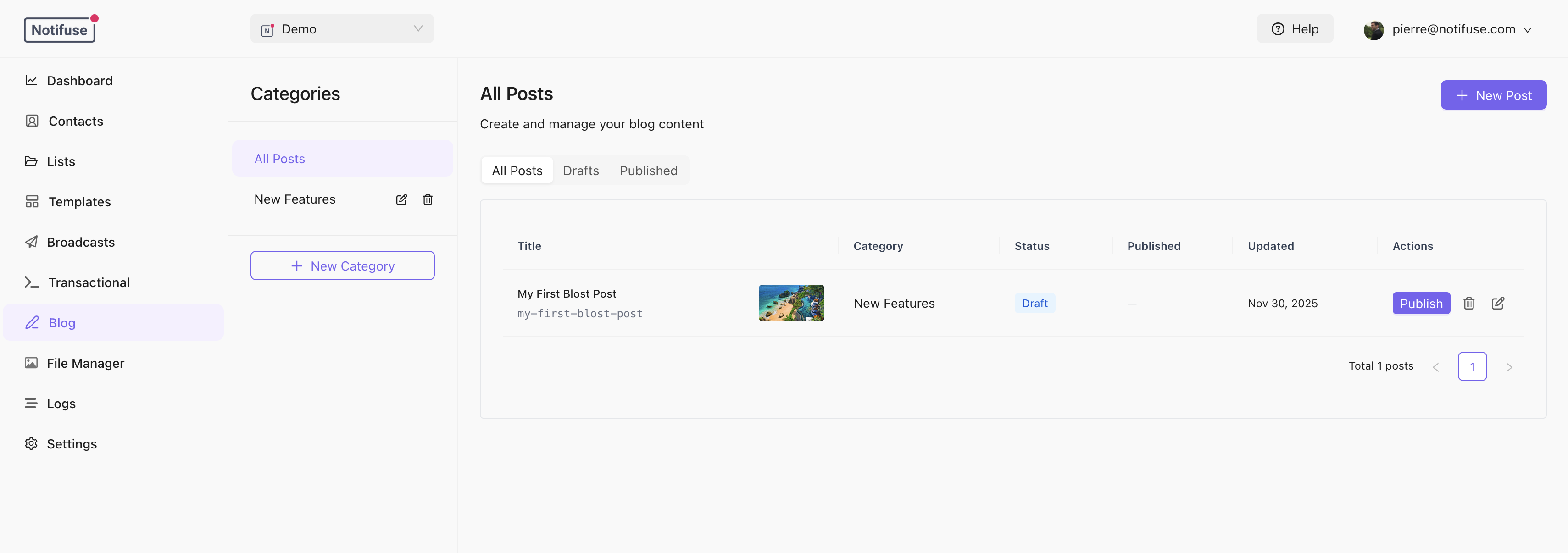 ## Categories
Posts are organized into categories. Each category has:
* **Name**: Display name
* **Slug**: URL identifier (lowercase, hyphens only)
* **Description**: Optional description
* **SEO Settings**: Default SEO for posts in this category
Create categories before adding posts.
## Creating Posts
1. Select a category from the sidebar
2. Click **New Post**
3. Fill in the post details
4. Save as draft or publish
## Categories
Posts are organized into categories. Each category has:
* **Name**: Display name
* **Slug**: URL identifier (lowercase, hyphens only)
* **Description**: Optional description
* **SEO Settings**: Default SEO for posts in this category
Create categories before adding posts.
## Creating Posts
1. Select a category from the sidebar
2. Click **New Post**
3. Fill in the post details
4. Save as draft or publish
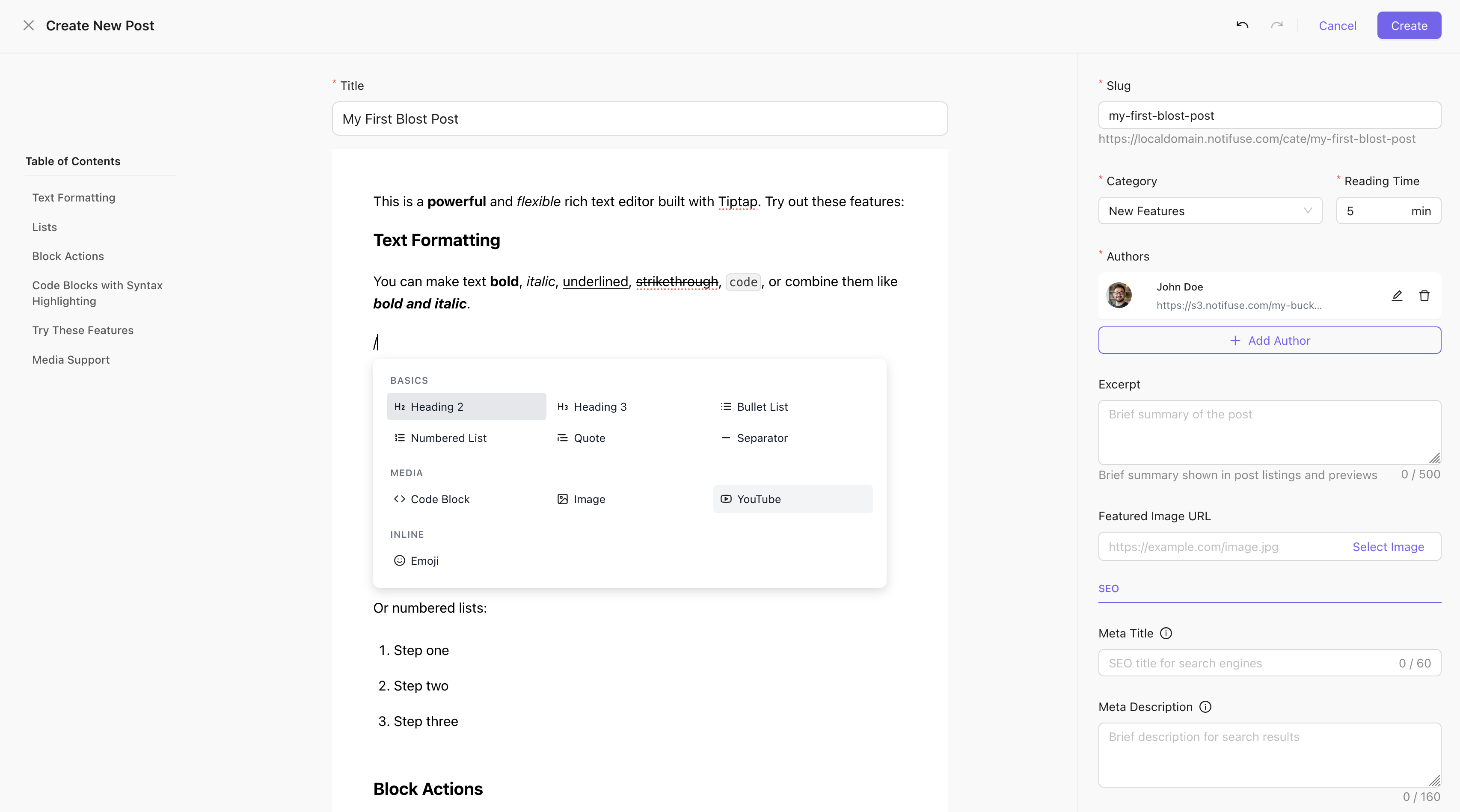 ## Post Fields
| Field | Description |
| ------------------ | ------------------------------------------ |
| **Title** | Post headline (max 500 chars) |
| **Slug** | URL identifier (auto-generated from title) |
| **Excerpt** | Short summary for listings |
| **Featured Image** | Cover image URL |
| **Authors** | Author names and avatar URLs |
| **Reading Time** | Estimated minutes to read |
| **Template** | Web template containing the post content |
## Publishing
### Publish Now
Click **Publish** to make the post live immediately.
### Schedule
Set a future `published_at` date to schedule publication:
1. Click **Schedule**
2. Select date and time
3. Choose timezone
4. The post goes live automatically at the scheduled time
### Unpublish
Click **Unpublish** to revert a post to draft status.
## SEO Settings
Each post can override category and blog-level SEO:
| Field | Description |
| -------------------- | ---------------------------------- |
| **Meta Title** | Title tag (defaults to post title) |
| **Meta Description** | Search result description |
| **OG Title** | Social sharing title |
| **OG Description** | Social sharing description |
| **OG Image** | Social sharing image |
| **Keywords** | Meta keywords |
| **Canonical URL** | Canonical URL override |
| **Meta Robots** | Crawling directives |
SEO inheritance: Post > Category > Blog defaults
## Post URLs
Posts are accessible at:
```
https://blog.example.com/{category-slug}/{post-slug}
```
Example: `https://blog.example.com/announcements/new-feature-launch`
## Deleting Posts
Deleted posts are soft-deleted and can be restored. They're removed from the public blog and sitemap immediately.
## Post Fields
| Field | Description |
| ------------------ | ------------------------------------------ |
| **Title** | Post headline (max 500 chars) |
| **Slug** | URL identifier (auto-generated from title) |
| **Excerpt** | Short summary for listings |
| **Featured Image** | Cover image URL |
| **Authors** | Author names and avatar URLs |
| **Reading Time** | Estimated minutes to read |
| **Template** | Web template containing the post content |
## Publishing
### Publish Now
Click **Publish** to make the post live immediately.
### Schedule
Set a future `published_at` date to schedule publication:
1. Click **Schedule**
2. Select date and time
3. Choose timezone
4. The post goes live automatically at the scheduled time
### Unpublish
Click **Unpublish** to revert a post to draft status.
## SEO Settings
Each post can override category and blog-level SEO:
| Field | Description |
| -------------------- | ---------------------------------- |
| **Meta Title** | Title tag (defaults to post title) |
| **Meta Description** | Search result description |
| **OG Title** | Social sharing title |
| **OG Description** | Social sharing description |
| **OG Image** | Social sharing image |
| **Keywords** | Meta keywords |
| **Canonical URL** | Canonical URL override |
| **Meta Robots** | Crawling directives |
SEO inheritance: Post > Category > Blog defaults
## Post URLs
Posts are accessible at:
```
https://blog.example.com/{category-slug}/{post-slug}
```
Example: `https://blog.example.com/announcements/new-feature-launch`
## Deleting Posts
Deleted posts are soft-deleted and can be restored. They're removed from the public blog and sitemap immediately.