> ## Documentation Index
> Fetch the complete documentation index at: https://docs.notifuse.com/llms.txt
> Use this file to discover all available pages before exploring further.
# Contacts
> Contacts are the foundation of your email marketing efforts in Notifuse. They represent your subscribers, customers, and prospects, complete with detailed profiles, custom fields, and engagement history.
 ## Overview
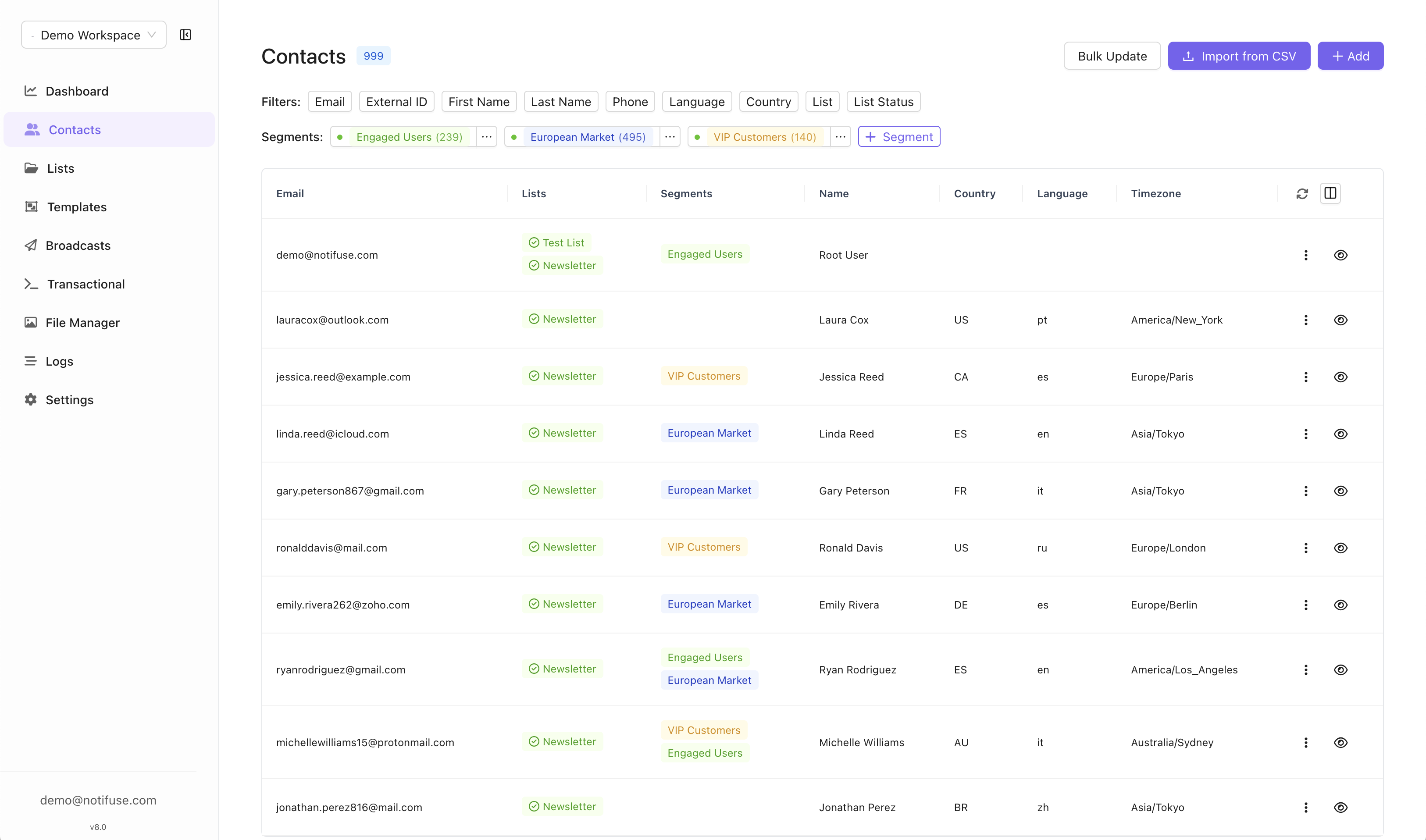
Contacts in Notifuse are comprehensive customer profiles that store subscriber information, preferences, and engagement data. They support flexible data storage through predefined fields and can be associated with multiple mailing lists.
## Contact Fields
| Field | Type | Description |
| ------------------------------------------ | -------- | ------------------------------------------ |
| `email` | String | Contact's email address (**Required**) |
| `external_id` | String | Your system's unique identifier |
| `first_name` | String | Contact's first name |
| `last_name` | String | Contact's last name |
| `phone` | String | Phone number |
| `timezone` | String | Contact's ISO timezone |
| `language` | String | Preferred language |
| `job_title` | String | Professional title |
| `address_line_1` | String | Primary address |
| `address_line_2` | String | Secondary address (apartment, suite, etc.) |
| `country` | String | Country ISO format |
| `state` | String | State or province |
| `postcode` | String | Postal/ZIP code |
| `custom_string_1` to `custom_string_5` | String | Custom string fields |
| `custom_number_1` to `custom_number_5` | Number | Custom number fields |
| `custom_datetime_1` to `custom_datetime_5` | DateTime | Custom datetime fields |
| `custom_json_1` to `custom_json_5` | JSON | Custom JSON fields |
## Overview
Contacts in Notifuse are comprehensive customer profiles that store subscriber information, preferences, and engagement data. They support flexible data storage through predefined fields and can be associated with multiple mailing lists.
## Contact Fields
| Field | Type | Description |
| ------------------------------------------ | -------- | ------------------------------------------ |
| `email` | String | Contact's email address (**Required**) |
| `external_id` | String | Your system's unique identifier |
| `first_name` | String | Contact's first name |
| `last_name` | String | Contact's last name |
| `phone` | String | Phone number |
| `timezone` | String | Contact's ISO timezone |
| `language` | String | Preferred language |
| `job_title` | String | Professional title |
| `address_line_1` | String | Primary address |
| `address_line_2` | String | Secondary address (apartment, suite, etc.) |
| `country` | String | Country ISO format |
| `state` | String | State or province |
| `postcode` | String | Postal/ZIP code |
| `custom_string_1` to `custom_string_5` | String | Custom string fields |
| `custom_number_1` to `custom_number_5` | Number | Custom number fields |
| `custom_datetime_1` to `custom_datetime_5` | DateTime | Custom datetime fields |
| `custom_json_1` to `custom_json_5` | JSON | Custom JSON fields |
 ## Contact Management
### Upsert Behavior
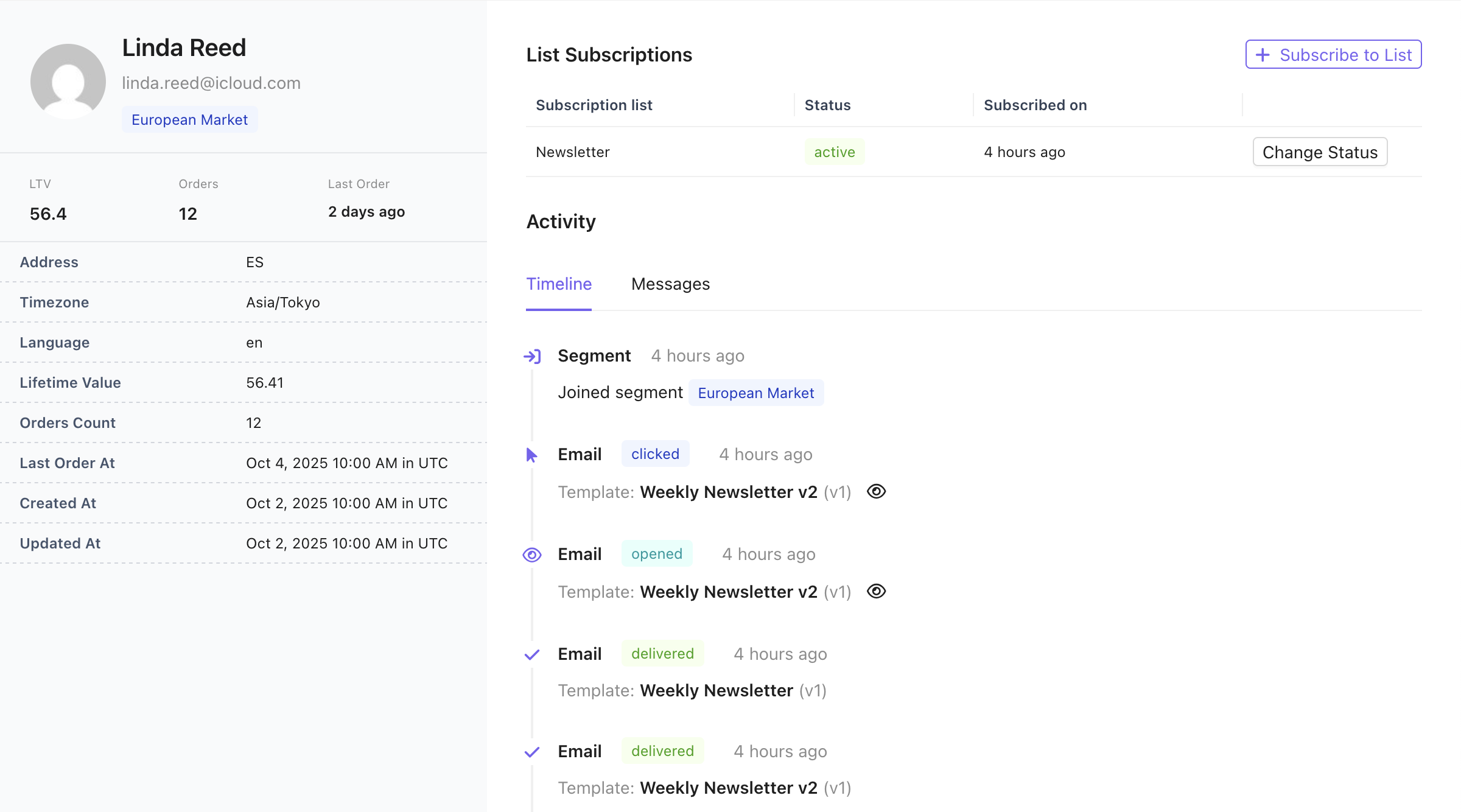
Contacts use upsert logic based on email address:
* **New emails**: Automatically creates a new contact
* **Existing emails**: Updates the existing contact with provided fields
* **Null values**: Setting any field to `null` removes that value from the contact
### List Subscriptions
* Contacts can subscribe to one or multiple mailing lists
* Subscription status is managed per list
* List memberships are tracked through the `contact_lists` relationship
## Contact Segmentation Engine
## Contact Management
### Upsert Behavior
Contacts use upsert logic based on email address:
* **New emails**: Automatically creates a new contact
* **Existing emails**: Updates the existing contact with provided fields
* **Null values**: Setting any field to `null` removes that value from the contact
### List Subscriptions
* Contacts can subscribe to one or multiple mailing lists
* Subscription status is managed per list
* List memberships are tracked through the `contact_lists` relationship
## Contact Segmentation Engine
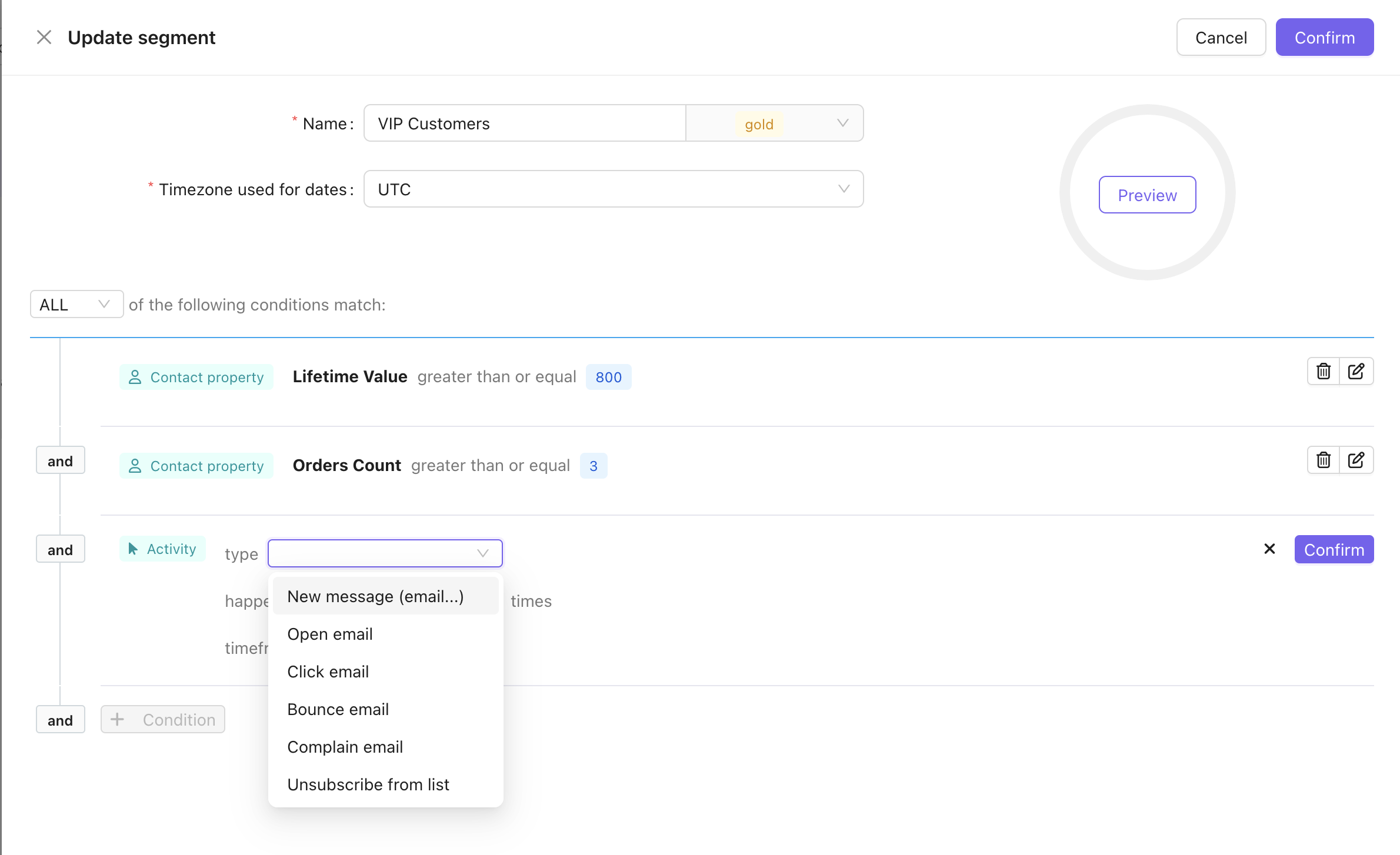 Notifuse includes a powerful real-time contact segmentation engine that allows you to create dynamic audience segments based on contact properties and engagement behavior. Segments automatically update as contact data changes, ensuring your targeting remains accurate and current.
### Building Segments
Segments are built using a flexible condition system that supports:
#### Contact Property Conditions
Filter contacts based on their profile data using standard comparison operators:
* **Numerical fields**: Custom number fields
* **Date fields**: Custom datetime fields
* **String fields**: `first_name`, `last_name`, `country`, custom string fields
* **Comparison operators**: greater than, less than, equal to, not equal to, contains, etc.
#### Goal-Based Conditions
Build RFM (Recency, Frequency, Monetary) segments using [Custom Events & Goals](/features/custom-events):
* **Monetary**: Total spend, average order value
* **Frequency**: Purchase count, event count
* **Recency**: Activity within a timeframe
Example segments: VIP customers (spent \$1000+), repeat buyers (3+ orders), at-risk customers (no purchase in 90 days).
#### Activity-Based Conditions
Target contacts based on their engagement behavior with your emails:
* **New message**: Contact received an email
* **Open email**: Contact opened an email
* **Click email**: Contact clicked a link in an email
* **Bounce email**: Email bounced for this contact
* **Complain email**: Contact marked an email as spam
* **Unsubscribe from list**: Contact unsubscribed from a mailing list
Activity conditions support additional parameters:
* **Frequency**: Number of times the activity occurred
* **Timeframe**: When the activity happened (e.g., in the last 30 days)
### Condition Logic
Segments support both AND/OR logic for combining multiple conditions:
* **ALL conditions**: Contact must match every condition (AND logic)
* **ANY conditions**: Contact needs to match at least one condition (OR logic)
### Use Cases
Common segmentation scenarios include:
* **VIP Customers**: High spenders with multiple purchases (use goal-based conditions)
* **Engagement Recovery**: Re-engage inactive subscribers who haven't opened emails in 90 days
* **At-Risk Customers**: Previously active buyers with no recent purchases
* **Geographic Targeting**: Send region-specific campaigns based on country or state
* **Behavioral Triggers**: Target users who clicked specific product links
### Technical Details
The segmentation engine leverages contact timeline data introduced in version 7.0, which tracks all contact interactions including messages, webhook events, and profile mutations. Activity events include granular `kind` field types (e.g., `open_email`, `click_email`) enabling precise behavioral targeting. All timestamps are stored in UTC timezone and can be evaluated in user-specified timezones for date-based conditions.
## Importing Contacts from CSV
Notifuse includes a powerful real-time contact segmentation engine that allows you to create dynamic audience segments based on contact properties and engagement behavior. Segments automatically update as contact data changes, ensuring your targeting remains accurate and current.
### Building Segments
Segments are built using a flexible condition system that supports:
#### Contact Property Conditions
Filter contacts based on their profile data using standard comparison operators:
* **Numerical fields**: Custom number fields
* **Date fields**: Custom datetime fields
* **String fields**: `first_name`, `last_name`, `country`, custom string fields
* **Comparison operators**: greater than, less than, equal to, not equal to, contains, etc.
#### Goal-Based Conditions
Build RFM (Recency, Frequency, Monetary) segments using [Custom Events & Goals](/features/custom-events):
* **Monetary**: Total spend, average order value
* **Frequency**: Purchase count, event count
* **Recency**: Activity within a timeframe
Example segments: VIP customers (spent \$1000+), repeat buyers (3+ orders), at-risk customers (no purchase in 90 days).
#### Activity-Based Conditions
Target contacts based on their engagement behavior with your emails:
* **New message**: Contact received an email
* **Open email**: Contact opened an email
* **Click email**: Contact clicked a link in an email
* **Bounce email**: Email bounced for this contact
* **Complain email**: Contact marked an email as spam
* **Unsubscribe from list**: Contact unsubscribed from a mailing list
Activity conditions support additional parameters:
* **Frequency**: Number of times the activity occurred
* **Timeframe**: When the activity happened (e.g., in the last 30 days)
### Condition Logic
Segments support both AND/OR logic for combining multiple conditions:
* **ALL conditions**: Contact must match every condition (AND logic)
* **ANY conditions**: Contact needs to match at least one condition (OR logic)
### Use Cases
Common segmentation scenarios include:
* **VIP Customers**: High spenders with multiple purchases (use goal-based conditions)
* **Engagement Recovery**: Re-engage inactive subscribers who haven't opened emails in 90 days
* **At-Risk Customers**: Previously active buyers with no recent purchases
* **Geographic Targeting**: Send region-specific campaigns based on country or state
* **Behavioral Triggers**: Target users who clicked specific product links
### Technical Details
The segmentation engine leverages contact timeline data introduced in version 7.0, which tracks all contact interactions including messages, webhook events, and profile mutations. Activity events include granular `kind` field types (e.g., `open_email`, `click_email`) enabling precise behavioral targeting. All timestamps are stored in UTC timezone and can be evaluated in user-specified timezones for date-based conditions.
## Importing Contacts from CSV
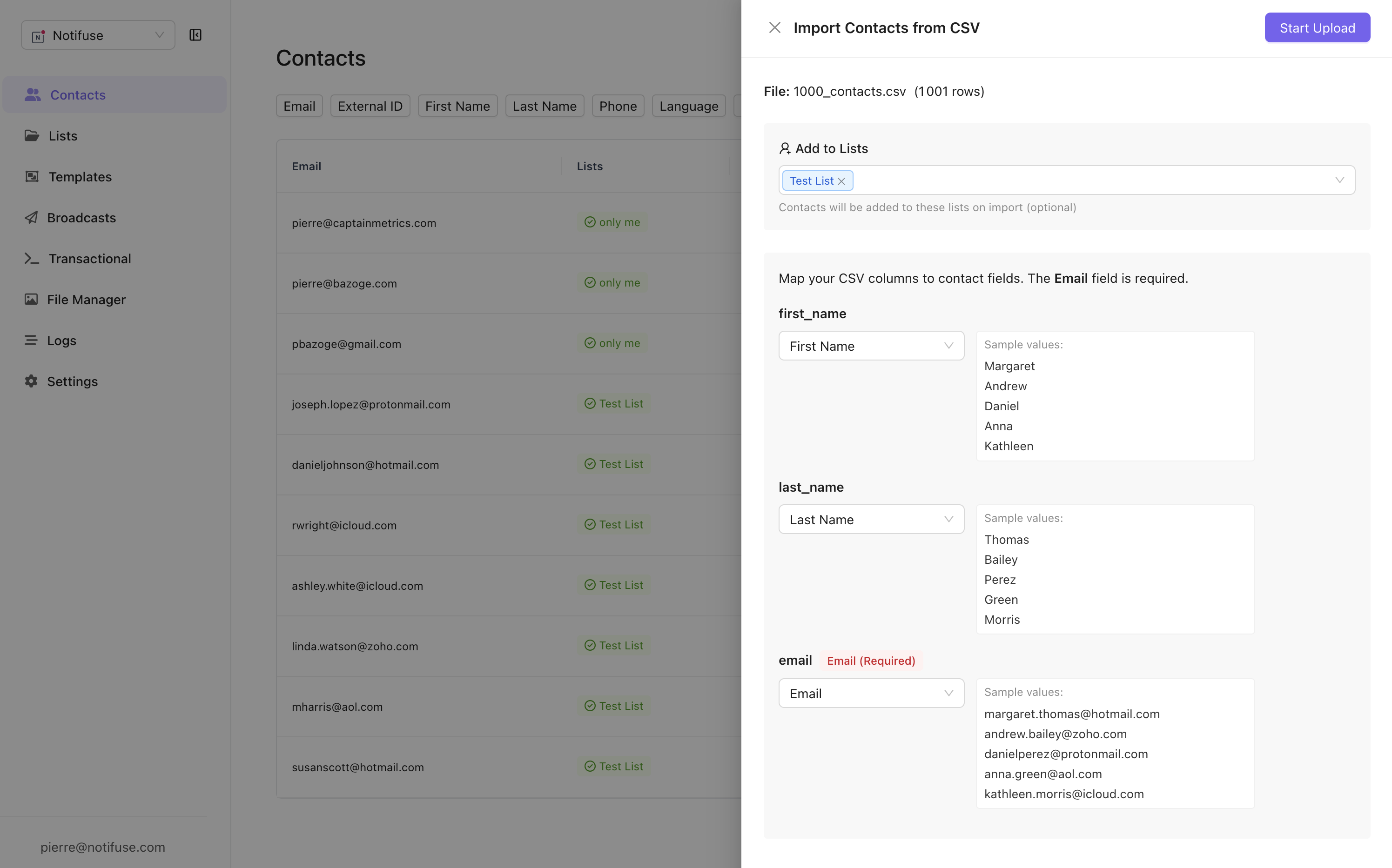 Notifuse provides a powerful CSV import feature that streamlines the process of adding multiple contacts to your workspace. The import system is designed to be intuitive and robust, handling large datasets efficiently.
### Auto-Detection and Field Mapping
The CSV importer automatically detects and suggests field mappings based on your CSV column headers. Common column names like "email", "first\_name", "last\_name", and "phone" are automatically matched to their corresponding contact fields. For custom or non-standard column names, you can manually map each CSV column to the appropriate contact field through an intuitive interface.
### Mailing List Assignment
During the import process, you can select one or multiple mailing lists to add your contacts to. This allows you to immediately segment your imported contacts and ensures they're properly organized within your workspace. All imported contacts will be automatically subscribed to the selected lists upon successful import.
### Progress Tracking and Recovery
The import process includes automatic progress saving, which means if your import is interrupted due to network issues or browser closure, you can resume from where you left off. This is particularly valuable when importing large CSV files with thousands of contacts, ensuring no data is lost during the process.
## Key Features
* **Flexible Schema**: Predefined fields cover most use cases while custom fields provide extensibility
* **Automatic Deduplication**: Email-based upserts prevent duplicate contacts
* **Multi-List Support**: Single contact can belong to multiple mailing lists
* **Data Removal**: Explicit null handling for field cleanup
Notifuse provides a powerful CSV import feature that streamlines the process of adding multiple contacts to your workspace. The import system is designed to be intuitive and robust, handling large datasets efficiently.
### Auto-Detection and Field Mapping
The CSV importer automatically detects and suggests field mappings based on your CSV column headers. Common column names like "email", "first\_name", "last\_name", and "phone" are automatically matched to their corresponding contact fields. For custom or non-standard column names, you can manually map each CSV column to the appropriate contact field through an intuitive interface.
### Mailing List Assignment
During the import process, you can select one or multiple mailing lists to add your contacts to. This allows you to immediately segment your imported contacts and ensures they're properly organized within your workspace. All imported contacts will be automatically subscribed to the selected lists upon successful import.
### Progress Tracking and Recovery
The import process includes automatic progress saving, which means if your import is interrupted due to network issues or browser closure, you can resume from where you left off. This is particularly valuable when importing large CSV files with thousands of contacts, ensuring no data is lost during the process.
## Key Features
* **Flexible Schema**: Predefined fields cover most use cases while custom fields provide extensibility
* **Automatic Deduplication**: Email-based upserts prevent duplicate contacts
* **Multi-List Support**: Single contact can belong to multiple mailing lists
* **Data Removal**: Explicit null handling for field cleanup