> ## Documentation Index
> Fetch the complete documentation index at: https://docs.notifuse.com/llms.txt
> Use this file to discover all available pages before exploring further.
# Custom Events & Goals
> Track user behavior and conversion goals to build RFM segments and enrich contact timelines.
## Overview
Custom events track user actions from external systems (e-commerce, CRM, analytics). They appear in the contact timeline and enable goal-based segmentation for building RFM (Recency, Frequency, Monetary) segments.
## Contact Timeline
Every custom event creates an entry in the contact timeline, giving you a complete history of user interactions:
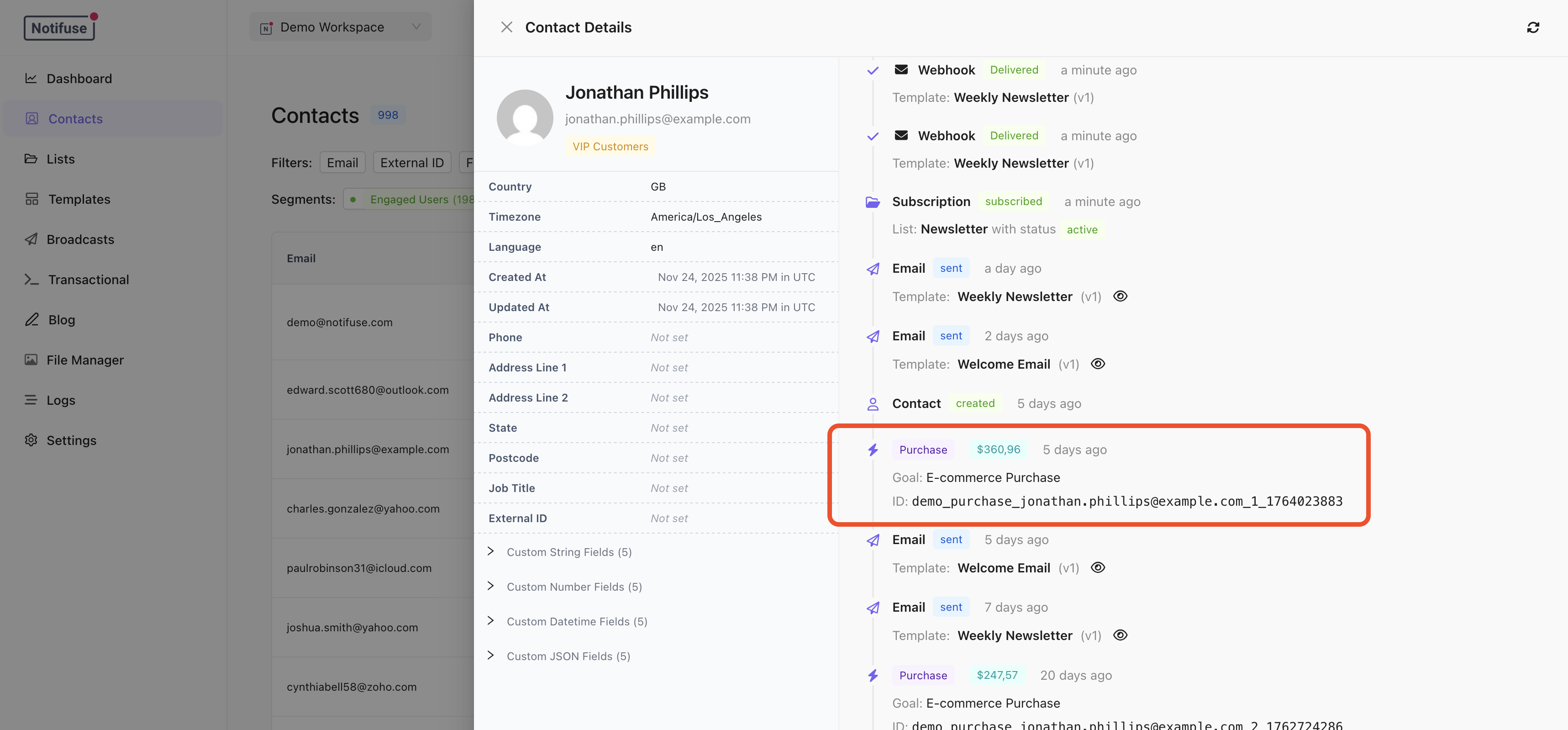 Events display with their `event_name` as the timeline entry type (e.g., "order.completed", "subscription.started"). The `properties` field stores additional context visible in the timeline details.
## Goal Types
Goals are the key to building powerful segments. Each event can optionally track a goal:
| Type | Use Case | goal\_value |
| -------------- | ------------------------------------ | ----------- |
| `purchase` | E-commerce orders, one-time payments | Required |
| `subscription` | SaaS subscriptions, memberships | Required |
| `lead` | Contact forms, demo requests | Optional |
| `signup` | Account registrations | Optional |
| `booking` | Appointments, consultations | Optional |
| `trial` | Free trial activations | Optional |
| `other` | Custom conversion events | Optional |
## Building RFM Segments
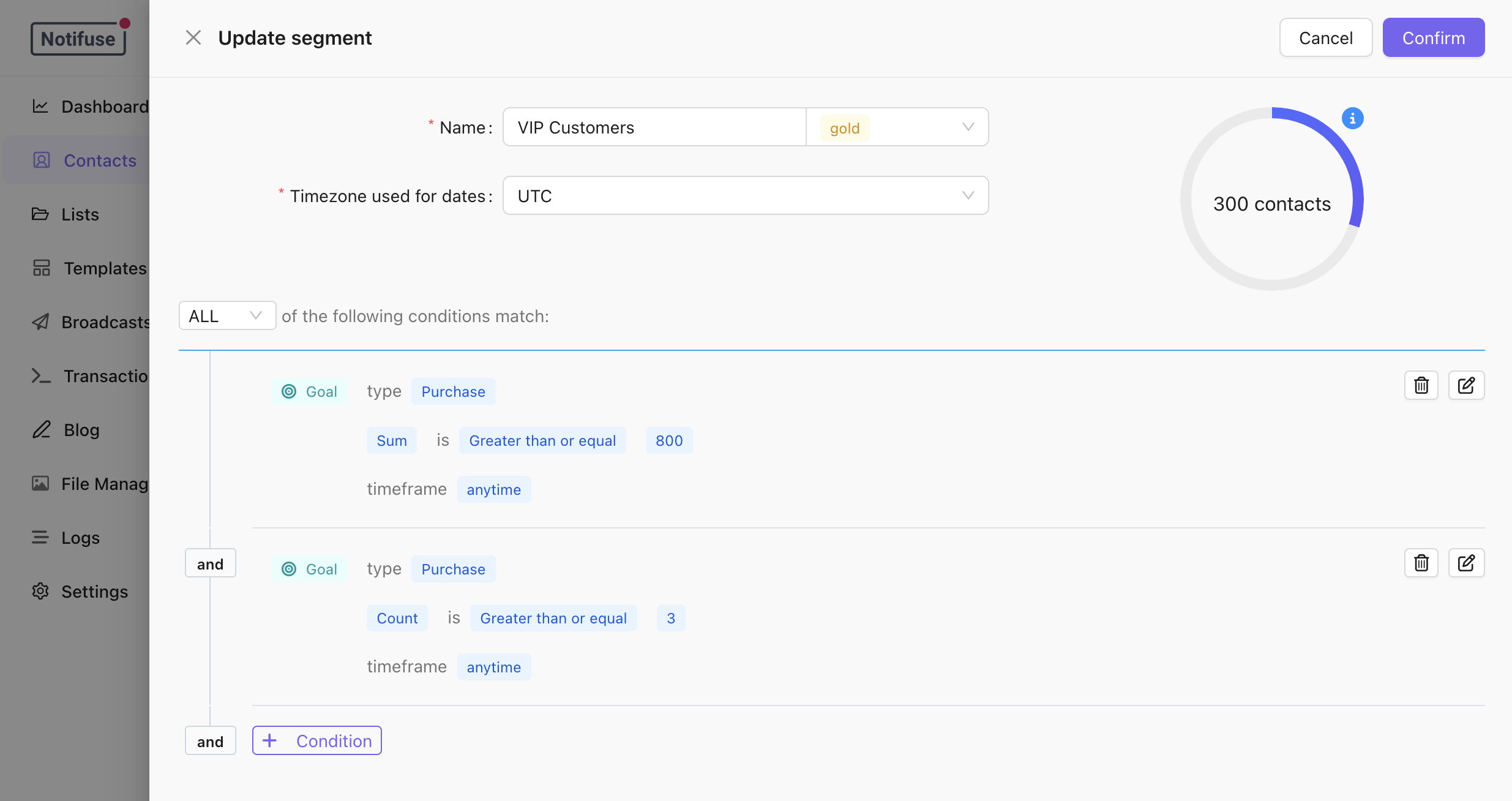
RFM (Recency, Frequency, Monetary) analysis identifies your best customers. Use the segment builder with "Custom Events Goals" conditions:
Events display with their `event_name` as the timeline entry type (e.g., "order.completed", "subscription.started"). The `properties` field stores additional context visible in the timeline details.
## Goal Types
Goals are the key to building powerful segments. Each event can optionally track a goal:
| Type | Use Case | goal\_value |
| -------------- | ------------------------------------ | ----------- |
| `purchase` | E-commerce orders, one-time payments | Required |
| `subscription` | SaaS subscriptions, memberships | Required |
| `lead` | Contact forms, demo requests | Optional |
| `signup` | Account registrations | Optional |
| `booking` | Appointments, consultations | Optional |
| `trial` | Free trial activations | Optional |
| `other` | Custom conversion events | Optional |
## Building RFM Segments
RFM (Recency, Frequency, Monetary) analysis identifies your best customers. Use the segment builder with "Custom Events Goals" conditions:
 ### Monetary: Total Spend
Select goal type "purchase", aggregate "sum", and set a minimum value to find high-spending customers.
### Frequency: Purchase Count
Select goal type "purchase", aggregate "count", and set a minimum number to find repeat buyers.
### Recency: Recent Activity
Use the timeframe filter "in the last X days" to find customers with recent purchases.
### Example RFM Segments
* **VIP Customers**: Spent \$1000+ AND 5+ orders AND purchased in last 60 days
* **At-Risk High-Value**: Spent \$500+ AND no purchase in 90 days
* **New High-Potential**: First purchase over \$200 in last 30 days
### Aggregate Options
| Option | Description |
| ------- | ----------------------------------------- |
| Sum | Total of all goal values (lifetime spend) |
| Count | Number of events (order count) |
| Average | Average goal value (AOV) |
| Min | Smallest goal value |
| Max | Largest goal value |
### Timeframe Options
| Option | Description |
| ------------------ | --------------------- |
| Anytime | All historical data |
| In the last X days | Rolling window |
| In date range | Specific period |
| Before date | Historical cutoff |
| After date | Since a specific date |
## Tracking Events
### Single Event
```bash theme={null}
curl -X POST "https://your-instance.com/api/customEvents.upsert" \
-H "Authorization: Bearer YOUR_API_KEY" \
-H "Content-Type: application/json" \
-d '{
"workspace_id": "your_workspace",
"email": "customer@example.com",
"event_name": "order.completed",
"external_id": "order_12345",
"properties": {
"items": ["Product A", "Product B"],
"currency": "USD"
},
"goal_type": "purchase",
"goal_value": 149.99
}'
```
### Batch Import
Import up to 50 events at once:
```bash theme={null}
curl -X POST "https://your-instance.com/api/customEvents.import" \
-H "Authorization: Bearer YOUR_API_KEY" \
-H "Content-Type: application/json" \
-d '{
"workspace_id": "your_workspace",
"events": [
{
"email": "user1@example.com",
"event_name": "order.completed",
"external_id": "order_001",
"goal_type": "purchase",
"goal_value": 99.99
},
{
"email": "user2@example.com",
"event_name": "order.completed",
"external_id": "order_002",
"goal_type": "purchase",
"goal_value": 249.99
}
]
}'
```
## Event Name Format
Event names must be lowercase using letters, numbers, dots, underscores, hyphens, or slashes:
* `order.completed`
* `subscription/started`
* `form_submit`
* `user-signup`
## Handling Refunds
Use negative `goal_value` for refunds to keep accurate LTV calculations:
```json theme={null}
{
"email": "customer@example.com",
"event_name": "order.refunded",
"external_id": "refund_12345",
"goal_type": "purchase",
"goal_value": -50.00
}
```
## Notes
* Contacts are auto-created if they don't exist
* Events update only if `occurred_at` is newer than existing
* Soft-delete by setting `deleted_at` (set to `null` to restore)
* See [API Reference](/api-reference/import-custom-events) for complete endpoint documentation
### Monetary: Total Spend
Select goal type "purchase", aggregate "sum", and set a minimum value to find high-spending customers.
### Frequency: Purchase Count
Select goal type "purchase", aggregate "count", and set a minimum number to find repeat buyers.
### Recency: Recent Activity
Use the timeframe filter "in the last X days" to find customers with recent purchases.
### Example RFM Segments
* **VIP Customers**: Spent \$1000+ AND 5+ orders AND purchased in last 60 days
* **At-Risk High-Value**: Spent \$500+ AND no purchase in 90 days
* **New High-Potential**: First purchase over \$200 in last 30 days
### Aggregate Options
| Option | Description |
| ------- | ----------------------------------------- |
| Sum | Total of all goal values (lifetime spend) |
| Count | Number of events (order count) |
| Average | Average goal value (AOV) |
| Min | Smallest goal value |
| Max | Largest goal value |
### Timeframe Options
| Option | Description |
| ------------------ | --------------------- |
| Anytime | All historical data |
| In the last X days | Rolling window |
| In date range | Specific period |
| Before date | Historical cutoff |
| After date | Since a specific date |
## Tracking Events
### Single Event
```bash theme={null}
curl -X POST "https://your-instance.com/api/customEvents.upsert" \
-H "Authorization: Bearer YOUR_API_KEY" \
-H "Content-Type: application/json" \
-d '{
"workspace_id": "your_workspace",
"email": "customer@example.com",
"event_name": "order.completed",
"external_id": "order_12345",
"properties": {
"items": ["Product A", "Product B"],
"currency": "USD"
},
"goal_type": "purchase",
"goal_value": 149.99
}'
```
### Batch Import
Import up to 50 events at once:
```bash theme={null}
curl -X POST "https://your-instance.com/api/customEvents.import" \
-H "Authorization: Bearer YOUR_API_KEY" \
-H "Content-Type: application/json" \
-d '{
"workspace_id": "your_workspace",
"events": [
{
"email": "user1@example.com",
"event_name": "order.completed",
"external_id": "order_001",
"goal_type": "purchase",
"goal_value": 99.99
},
{
"email": "user2@example.com",
"event_name": "order.completed",
"external_id": "order_002",
"goal_type": "purchase",
"goal_value": 249.99
}
]
}'
```
## Event Name Format
Event names must be lowercase using letters, numbers, dots, underscores, hyphens, or slashes:
* `order.completed`
* `subscription/started`
* `form_submit`
* `user-signup`
## Handling Refunds
Use negative `goal_value` for refunds to keep accurate LTV calculations:
```json theme={null}
{
"email": "customer@example.com",
"event_name": "order.refunded",
"external_id": "refund_12345",
"goal_type": "purchase",
"goal_value": -50.00
}
```
## Notes
* Contacts are auto-created if they don't exist
* Events update only if `occurred_at` is newer than existing
* Soft-delete by setting `deleted_at` (set to `null` to restore)
* See [API Reference](/api-reference/import-custom-events) for complete endpoint documentation