> ## Documentation Index
> Fetch the complete documentation index at: https://docs.notifuse.com/llms.txt
> Use this file to discover all available pages before exploring further.
# Goals
> Record conversions from your website and use them in segments and automations.
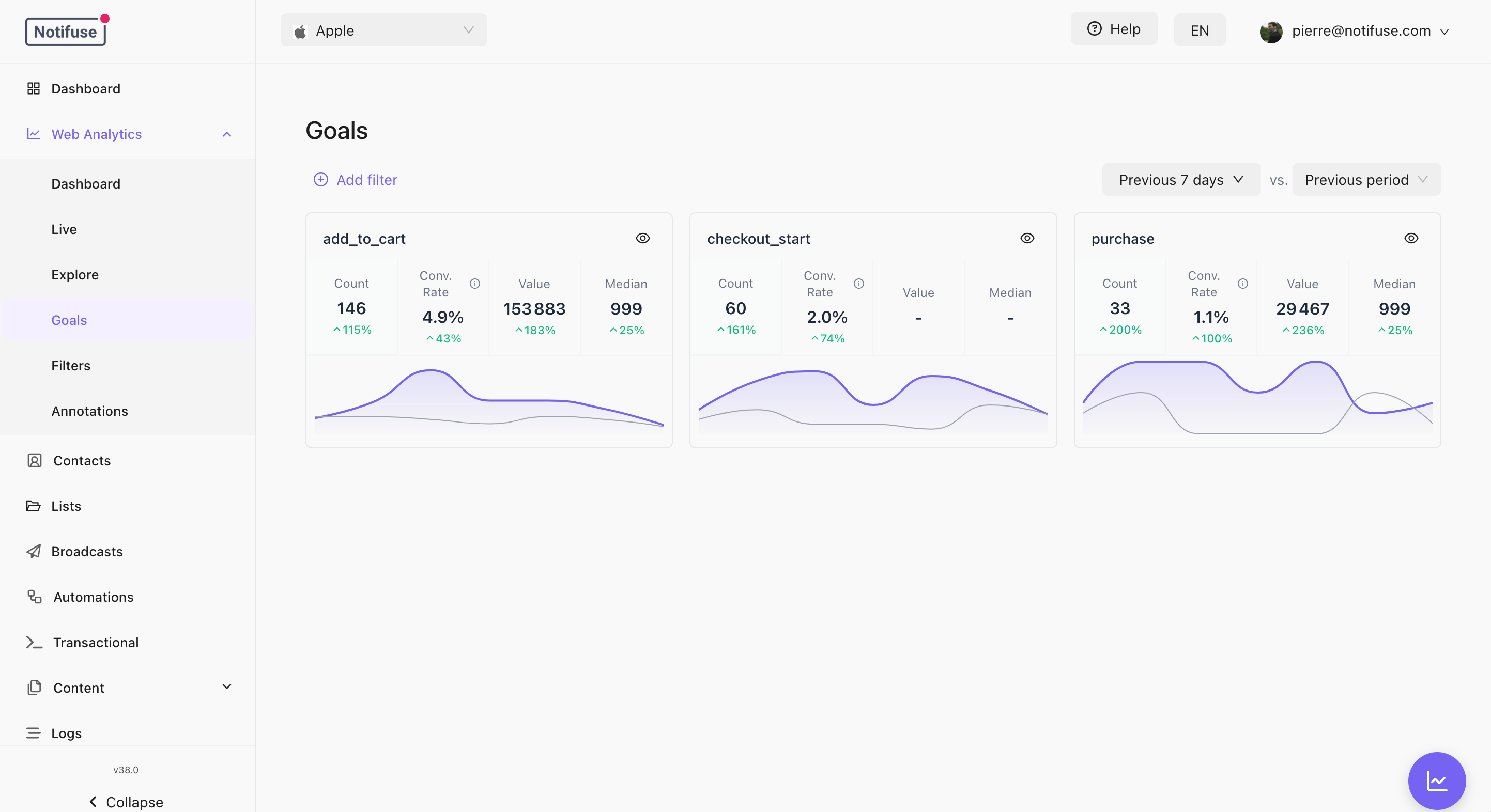 A goal is something worth counting: a signup, a purchase, a demo request. Your site reports it, and Web Analytics records it against the visit that produced it.
## Recording a Goal
```javascript theme={null}
NotifuseAnalytics.trackGoal({ action: 'purchase', type: 'purchase', value: 49.9 })
```
| Field | Required | Notes |
| ------------ | -------- | ------------------------------------------------------------------------------------------------------------- |
| `action` | Yes | The goal name, up to 100 bytes — 100 ASCII characters, fewer for accented or non-Latin text. |
| `type` | Yes | What kind of conversion this is: `purchase`, `subscription`, `lead`, `signup`, `booking`, `trial` or `other`. |
| `value` | No | A non-negative number — revenue, or whatever you are totalling. |
| `properties` | No | Up to 50 string values of your own, 1024 bytes each and 8 KB in total. |
`type` is required because only your site knows whether a conversion is a sale or
a lead, and the goal-based segment conditions filter on it. `trackGoal` throws
without it. Use `other` when none of the rest fit.
The current page path and its position in the visit are attached for you, so a goal always knows where it happened.
Goals are sent immediately rather than waiting for the next heartbeat. A conversion on a page the visitor is about to leave still arrives.
A negative `value` makes the whole goal invalid, and the goal is discarded — name and all, not just the number. This differs from the [Custom Events](/features/custom-events) API, which deliberately accepts negative values for refunds and chargebacks.
You do not declare goals anywhere first. The Goals tab lists whatever names your site has actually sent, ordered by conversions, showing up to the 30 most-converted goals for the period and filters you have applied.
## What a Goal Produces
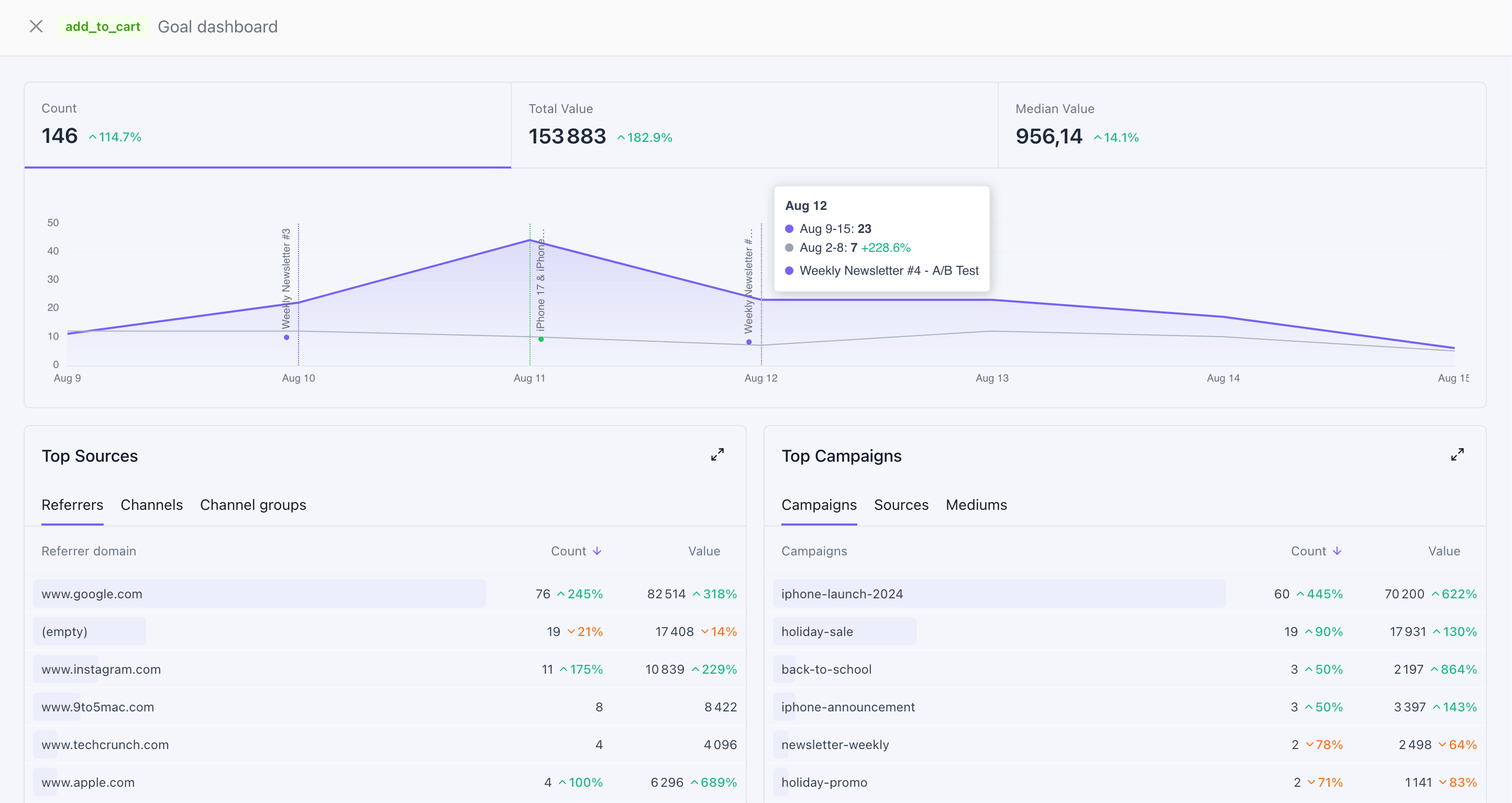
Clicking a goal opens its own dashboard — the conversions and value over time, annotated like the main chart, with the sources and campaigns that produced them.
A goal is something worth counting: a signup, a purchase, a demo request. Your site reports it, and Web Analytics records it against the visit that produced it.
## Recording a Goal
```javascript theme={null}
NotifuseAnalytics.trackGoal({ action: 'purchase', type: 'purchase', value: 49.9 })
```
| Field | Required | Notes |
| ------------ | -------- | ------------------------------------------------------------------------------------------------------------- |
| `action` | Yes | The goal name, up to 100 bytes — 100 ASCII characters, fewer for accented or non-Latin text. |
| `type` | Yes | What kind of conversion this is: `purchase`, `subscription`, `lead`, `signup`, `booking`, `trial` or `other`. |
| `value` | No | A non-negative number — revenue, or whatever you are totalling. |
| `properties` | No | Up to 50 string values of your own, 1024 bytes each and 8 KB in total. |
`type` is required because only your site knows whether a conversion is a sale or
a lead, and the goal-based segment conditions filter on it. `trackGoal` throws
without it. Use `other` when none of the rest fit.
The current page path and its position in the visit are attached for you, so a goal always knows where it happened.
Goals are sent immediately rather than waiting for the next heartbeat. A conversion on a page the visitor is about to leave still arrives.
A negative `value` makes the whole goal invalid, and the goal is discarded — name and all, not just the number. This differs from the [Custom Events](/features/custom-events) API, which deliberately accepts negative values for refunds and chargebacks.
You do not declare goals anywhere first. The Goals tab lists whatever names your site has actually sent, ordered by conversions, showing up to the 30 most-converted goals for the period and filters you have applied.
## What a Goal Produces
Clicking a goal opens its own dashboard — the conversions and value over time, annotated like the main chart, with the sources and campaigns that produced them.
 In the reports, goals give you the Goals, Total Goal Value, Avg Goal Value, Median Goal Value and Converting Sessions measures, and the Goal Name, Goal Path and Goal Value dimensions. At the session level, Sessions with Goals and Goal Value let you compare channels by what they actually converted rather than by traffic.
For an **identified** visitor, a goal also becomes a custom event on their contact timeline — which is what makes it reachable from segments and automations. See [Identifying Visitors](/web-analytics/identifying-visitors).
## Goal Names on the Contact Timeline
A goal that reaches a contact timeline is normalised first: lowercased, with anything outside ASCII `a–z`, `0–9`, `.` and `/` collapsed to a single `_`, leading and trailing `_` trimmed, and the result cut at 100 characters. So `Trial Started` arrives as `trial_started`, and it is that name an automation or segment matches on.
The kept set is ASCII-only, so accented and non-Latin letters are dropped rather than transliterated: `Café` arrives as `caf`. A name with no ASCII letters or digits at all — `購入`, say — normalises to nothing and never reaches the timeline. The goal is still recorded and still appears in the reports; only the timeline copy is skipped. Use ASCII goal names if you intend to segment or automate on them.
This is also narrower than the naming rule for events sent through the [Custom Events](/features/custom-events) API, which allows hyphens: `black-friday` sent from a web goal becomes `black_friday`.
## Using Web Goals in Segments
A web goal is as expressive as a custom event created through the API, because it
carries the same three things: a name, a value and a type.
* The **Custom Events Goal** condition matches web goals, under a specific type or
under **All types**, and counts, sums and averages their value.
* An **automation** can trigger on a custom event with the goal's normalised name.
The type is asserted by your site, not verified by Notifuse — the same page also
chooses the goal's name and value. Read revenue reporting with that in mind, as
you would for events sent through the API.
## Limits
* Up to 100 goals of one session are bridged to the contact timeline per write batch. Goals beyond that within the same batch are dropped from the timeline permanently, and the counter restarts on each batch — so a long visit that keeps converting can end up with more than 100 timeline entries in total. Either way the visit itself keeps recording; the cap only affects the timeline copy.
* A goal older than 24 hours is not bridged to a timeline. A visitor whose browser was offline for a day comes back with their visit intact, without firing "you just did this" automations a day late.
* A goal value above 1e12, a name over 100 bytes, or properties over 8 KB are dropped — the goal alone, never the rest of the visit.
## Notes
* Goals from anonymous visitors are recorded and reported normally. Only the timeline copy needs an identity.
* Bridged events carry the visit's context as properties — session id, path, landing path, UTM source / medium / campaign, device and country — alongside your own. Those keys are set by Notifuse and overwrite properties of the same name.
* A currency, an order id, or anything else the conversion carries goes in `properties` — those are sent and stored. There is no dedicated `currency` field: `goal_value` is a plain number, so if you record more than one currency, group your reports by the currency property rather than summing values across them.
* [API Reference](/api-reference)
In the reports, goals give you the Goals, Total Goal Value, Avg Goal Value, Median Goal Value and Converting Sessions measures, and the Goal Name, Goal Path and Goal Value dimensions. At the session level, Sessions with Goals and Goal Value let you compare channels by what they actually converted rather than by traffic.
For an **identified** visitor, a goal also becomes a custom event on their contact timeline — which is what makes it reachable from segments and automations. See [Identifying Visitors](/web-analytics/identifying-visitors).
## Goal Names on the Contact Timeline
A goal that reaches a contact timeline is normalised first: lowercased, with anything outside ASCII `a–z`, `0–9`, `.` and `/` collapsed to a single `_`, leading and trailing `_` trimmed, and the result cut at 100 characters. So `Trial Started` arrives as `trial_started`, and it is that name an automation or segment matches on.
The kept set is ASCII-only, so accented and non-Latin letters are dropped rather than transliterated: `Café` arrives as `caf`. A name with no ASCII letters or digits at all — `購入`, say — normalises to nothing and never reaches the timeline. The goal is still recorded and still appears in the reports; only the timeline copy is skipped. Use ASCII goal names if you intend to segment or automate on them.
This is also narrower than the naming rule for events sent through the [Custom Events](/features/custom-events) API, which allows hyphens: `black-friday` sent from a web goal becomes `black_friday`.
## Using Web Goals in Segments
A web goal is as expressive as a custom event created through the API, because it
carries the same three things: a name, a value and a type.
* The **Custom Events Goal** condition matches web goals, under a specific type or
under **All types**, and counts, sums and averages their value.
* An **automation** can trigger on a custom event with the goal's normalised name.
The type is asserted by your site, not verified by Notifuse — the same page also
chooses the goal's name and value. Read revenue reporting with that in mind, as
you would for events sent through the API.
## Limits
* Up to 100 goals of one session are bridged to the contact timeline per write batch. Goals beyond that within the same batch are dropped from the timeline permanently, and the counter restarts on each batch — so a long visit that keeps converting can end up with more than 100 timeline entries in total. Either way the visit itself keeps recording; the cap only affects the timeline copy.
* A goal older than 24 hours is not bridged to a timeline. A visitor whose browser was offline for a day comes back with their visit intact, without firing "you just did this" automations a day late.
* A goal value above 1e12, a name over 100 bytes, or properties over 8 KB are dropped — the goal alone, never the rest of the visit.
## Notes
* Goals from anonymous visitors are recorded and reported normally. Only the timeline copy needs an identity.
* Bridged events carry the visit's context as properties — session id, path, landing path, UTM source / medium / campaign, device and country — alongside your own. Those keys are set by Notifuse and overwrite properties of the same name.
* A currency, an order id, or anything else the conversion carries goes in `properties` — those are sent and stored. There is no dedicated `currency` field: `goal_value` is a plain number, so if you record more than one currency, group your reports by the currency property rather than summing values across them.
* [API Reference](/api-reference)