> ## Documentation Index
> Fetch the complete documentation index at: https://docs.notifuse.com/llms.txt
> Use this file to discover all available pages before exploring further.
# Setup
> Install the tracking snippet and configure cookieless website analytics for your workspace.
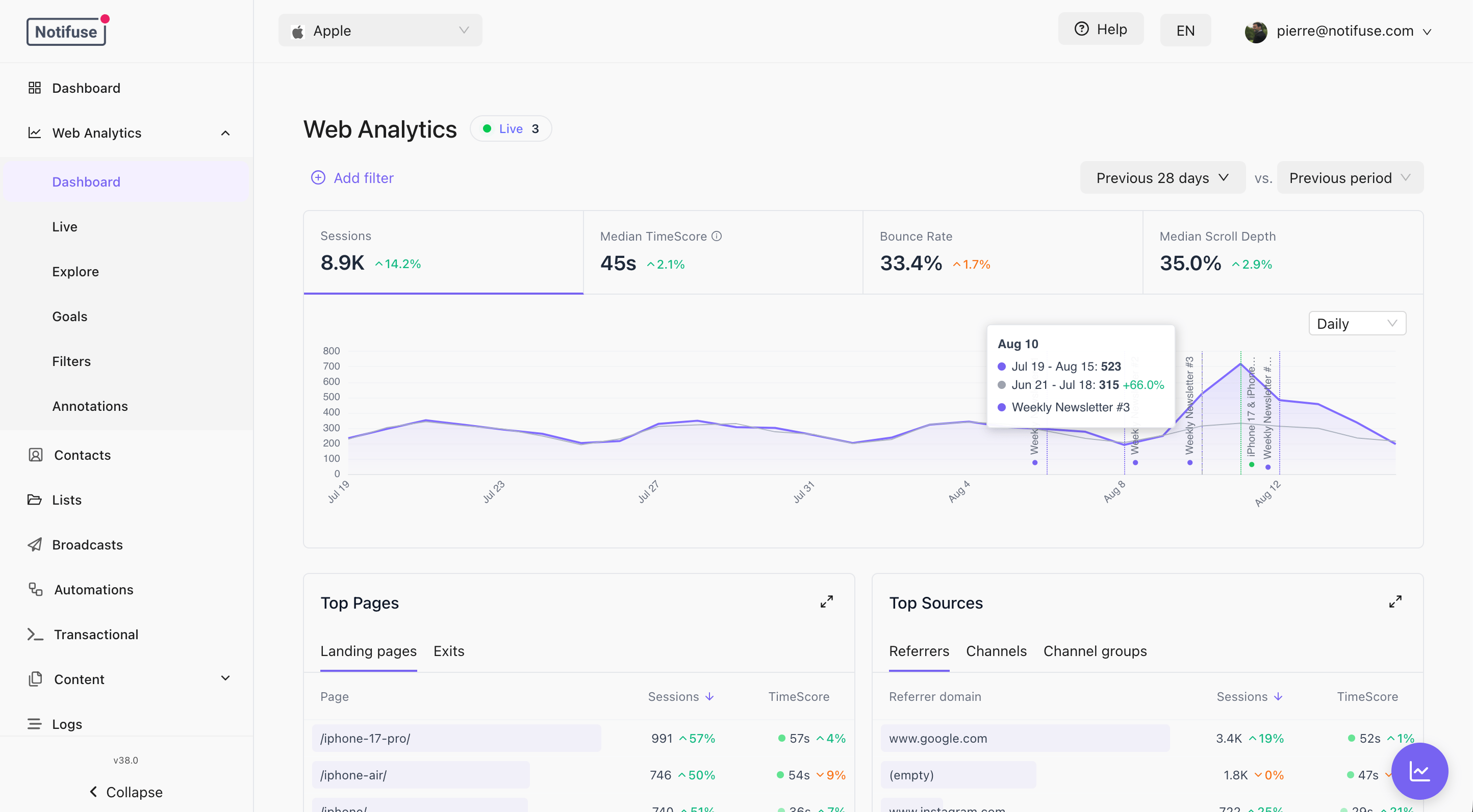 Web Analytics records visits to your website in your own database, alongside your contacts. It is cookieless, stores no IP addresses, and needs no third-party service.
* **First-party**: sessions, pageviews and goals live in your workspace database, in three tables partitioned by month.
* **Cookieless**: no cookie is set and no identifier follows a visitor across sites. A session lives in `localStorage` and ends after 30 minutes of inactivity, or 24 hours after it started, whichever comes first.
* **Attribution built in**: 39 seeded rules classify traffic into channels, so you can see what your broadcasts actually brought in.
* **Connected to contacts**: a visitor you identify has their visits recorded on the contact timeline, where segments can reach them.
## Enable Web Analytics
Navigate to **Settings** → **Web Analytics**, turn it on, and add at least one domain.
Web Analytics cannot be enabled with an empty domain list. The list is what decides which sites may send you traffic, and it is also the list of hosts allowed to receive an identity from a tracked email link.
## Install the Snippet
Paste this before the closing `` tag of every page you want to track.
```html theme={null}
```
The settings screen shows this snippet with your workspace ID and endpoint already filled in — copy it from there rather than editing the example.
The script is served from your own instance at `/na.js` and cached for an hour. A hashed variant, `/na..js`, is served with a one-year immutable cache; use it if your CDN prefers permanent URLs. Both send beats to `POST /track`.
Anything the tracker cannot accept — a disabled workspace, a domain that is not on your list, a request that looks like a bot — is answered with a success response and discarded. The SDK never retries something that cannot succeed, so a misconfiguration shows up as missing data rather than as errors in your browser console.
## Allowed Domains
Each entry is a hostname, with one optional leading wildcard.
| Entry | Matches | Does not match |
| --------------- | ---------------------------------------------------- | ------------------------------------- |
| `example.com` | `example.com` | `www.example.com`, `shop.example.com` |
| `*.example.com` | `example.com`, `www.example.com`, `shop.example.com` | `example.org` |
Ports are not part of a hostname and must not appear. A wildcard over a single label — `*.com`, `*.io` — is refused: it would hand every recipient's identity to every link in that suffix.
Most sites want `*.example.com`. It covers the apex domain and every subdomain, so `www` keeps working when someone adds it later.
## Settings
Web Analytics records visits to your website in your own database, alongside your contacts. It is cookieless, stores no IP addresses, and needs no third-party service.
* **First-party**: sessions, pageviews and goals live in your workspace database, in three tables partitioned by month.
* **Cookieless**: no cookie is set and no identifier follows a visitor across sites. A session lives in `localStorage` and ends after 30 minutes of inactivity, or 24 hours after it started, whichever comes first.
* **Attribution built in**: 39 seeded rules classify traffic into channels, so you can see what your broadcasts actually brought in.
* **Connected to contacts**: a visitor you identify has their visits recorded on the contact timeline, where segments can reach them.
## Enable Web Analytics
Navigate to **Settings** → **Web Analytics**, turn it on, and add at least one domain.
Web Analytics cannot be enabled with an empty domain list. The list is what decides which sites may send you traffic, and it is also the list of hosts allowed to receive an identity from a tracked email link.
## Install the Snippet
Paste this before the closing `` tag of every page you want to track.
```html theme={null}
```
The settings screen shows this snippet with your workspace ID and endpoint already filled in — copy it from there rather than editing the example.
The script is served from your own instance at `/na.js` and cached for an hour. A hashed variant, `/na..js`, is served with a one-year immutable cache; use it if your CDN prefers permanent URLs. Both send beats to `POST /track`.
Anything the tracker cannot accept — a disabled workspace, a domain that is not on your list, a request that looks like a bot — is answered with a success response and discarded. The SDK never retries something that cannot succeed, so a misconfiguration shows up as missing data rather than as errors in your browser console.
## Allowed Domains
Each entry is a hostname, with one optional leading wildcard.
| Entry | Matches | Does not match |
| --------------- | ---------------------------------------------------- | ------------------------------------- |
| `example.com` | `example.com` | `www.example.com`, `shop.example.com` |
| `*.example.com` | `example.com`, `www.example.com`, `shop.example.com` | `example.org` |
Ports are not part of a hostname and must not appear. A wildcard over a single label — `*.com`, `*.io` — is refused: it would hand every recipient's identity to every link in that suffix.
Most sites want `*.example.com`. It covers the apex domain and every subdomain, so `www` keeps working when someone adds it later.
## Settings
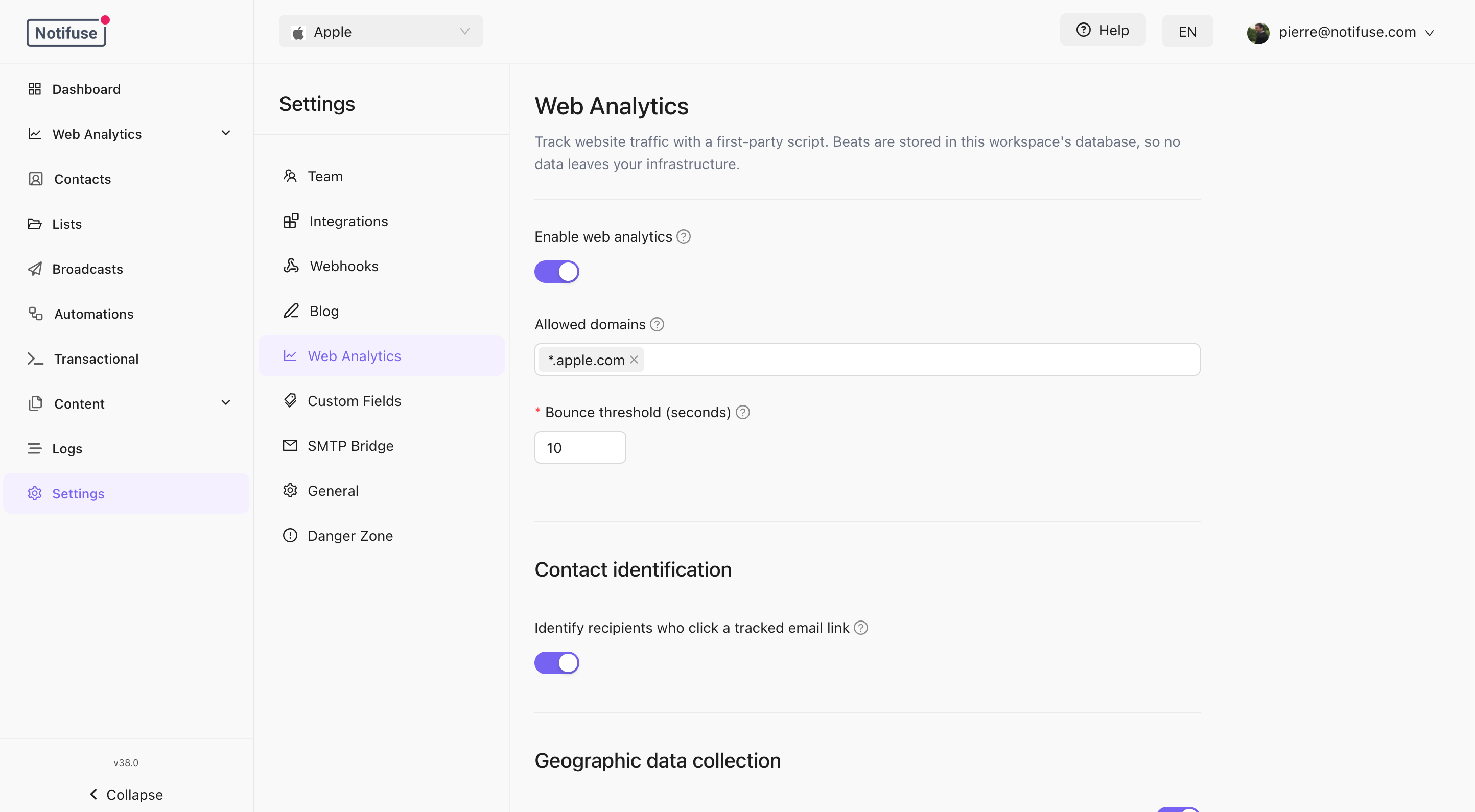 | Setting | What it does |
| ------------------------------------------------------ | ----------------------------------------------------------------------------------------------------------------------------------------------------- |
| **Enable Web Analytics** | Starts accepting beats. Off by default. |
| **Allowed domains** | The hostnames that may send traffic, and the only hosts a tracked email link may hand an identity to. |
| **Bounce threshold** | Seconds of engaged time below which a visit counts as a bounce. Defaults to 10. |
| **Identify recipients who click a tracked email link** | Lets Notifuse add a signed identity to the links of tracked emails. Off by default — see [Identifying Visitors](/web-analytics/identifying-visitors). |
| **Custom dimension labels** | Display names for `custom_1` through `custom_10`. See [Reports](/web-analytics/reports). |
| **Geolocation** | Whether to resolve the visitor's country, and how precisely. |
The bounce threshold is about engaged time, not page count: a visitor who reads one long article is not a bounce, and one who opens five pages in four seconds is.
## Geolocation
Country is resolved from the visitor's IP address using a bundled MaxMind GeoLite2 database. **The IP address itself is never stored** — it is used for the lookup and discarded.
* **Store region** and **Store city** add those named levels. Turning them off drops the region and city *names*.
* **Coordinate precision** controls how much of the latitude and longitude is kept: `0` ≈ country (\~111 km), `1` ≈ regional (\~11 km), `2` ≈ city (\~1 km). It defaults to `2`.
A coordinate is a place name in another form, so it is never kept finer than the
finest name you store — whatever the precision setting says. With **Store city**
off, coordinates are capped at `1`; with both name toggles off, at `0`. The
setting is a ceiling that these toggles can lower, never raise.
Coordinates are made coarser rather than dropped, so the Live map keeps showing
where visitors are. An empty map would read as "nobody is online".
Self-hosted instances ship the database at `/app/geoip/GeoLite2-City.mmdb`. Point `GEOIP_DB_PATH` at another file to use your own.
## Permissions
Changing these settings requires `web_analytics` **write**. Reading the reports requires `web_analytics` **read**, and the **Web Analytics** section appears in the sidebar for a member holding either one.
The settings panel itself is not gated: any workspace member can open it and see the current configuration read-only, including the allowed domains.
## Notes
* Sessions, pageviews and goals are stored in three monthly-partitioned tables in your workspace database. There is no retention setting yet — nothing is deleted automatically.
* A session carries at most 1000 recorded actions. Beyond that the visit keeps being counted but new actions are dropped.
* Deleting a contact removes their address from every analytics row. The traffic itself remains, as anonymous.
* [API Reference](/api-reference)
| Setting | What it does |
| ------------------------------------------------------ | ----------------------------------------------------------------------------------------------------------------------------------------------------- |
| **Enable Web Analytics** | Starts accepting beats. Off by default. |
| **Allowed domains** | The hostnames that may send traffic, and the only hosts a tracked email link may hand an identity to. |
| **Bounce threshold** | Seconds of engaged time below which a visit counts as a bounce. Defaults to 10. |
| **Identify recipients who click a tracked email link** | Lets Notifuse add a signed identity to the links of tracked emails. Off by default — see [Identifying Visitors](/web-analytics/identifying-visitors). |
| **Custom dimension labels** | Display names for `custom_1` through `custom_10`. See [Reports](/web-analytics/reports). |
| **Geolocation** | Whether to resolve the visitor's country, and how precisely. |
The bounce threshold is about engaged time, not page count: a visitor who reads one long article is not a bounce, and one who opens five pages in four seconds is.
## Geolocation
Country is resolved from the visitor's IP address using a bundled MaxMind GeoLite2 database. **The IP address itself is never stored** — it is used for the lookup and discarded.
* **Store region** and **Store city** add those named levels. Turning them off drops the region and city *names*.
* **Coordinate precision** controls how much of the latitude and longitude is kept: `0` ≈ country (\~111 km), `1` ≈ regional (\~11 km), `2` ≈ city (\~1 km). It defaults to `2`.
A coordinate is a place name in another form, so it is never kept finer than the
finest name you store — whatever the precision setting says. With **Store city**
off, coordinates are capped at `1`; with both name toggles off, at `0`. The
setting is a ceiling that these toggles can lower, never raise.
Coordinates are made coarser rather than dropped, so the Live map keeps showing
where visitors are. An empty map would read as "nobody is online".
Self-hosted instances ship the database at `/app/geoip/GeoLite2-City.mmdb`. Point `GEOIP_DB_PATH` at another file to use your own.
## Permissions
Changing these settings requires `web_analytics` **write**. Reading the reports requires `web_analytics` **read**, and the **Web Analytics** section appears in the sidebar for a member holding either one.
The settings panel itself is not gated: any workspace member can open it and see the current configuration read-only, including the allowed domains.
## Notes
* Sessions, pageviews and goals are stored in three monthly-partitioned tables in your workspace database. There is no retention setting yet — nothing is deleted automatically.
* A session carries at most 1000 recorded actions. Beyond that the visit keeps being counted but new actions are dropped.
* Deleting a contact removes their address from every analytics row. The traffic itself remains, as anonymous.
* [API Reference](/api-reference)