
Overview
The audit log records every control-plane action taken on a deployment: a member invited, a permission set changed, an API key created, an integration edited, a template saved, a broadcast scheduled, a contact deleted, the licence installed. Each entry names the actor, the action, what it was done to, the IP address and user agent it came from, the request id, and whether it succeeded, failed or was refused. The security-sensitive actions also carry a before/after of what changed, with every secret redacted. It never records the data plane — contact upserts, sends, tracking, custom events — which can run at thousands of requests a minute and belongs in Logs, not in a trail. Audit logs are a licensed capability (Enterprise): recording happens only while a licence key coveringaudit_logs is installed. Reading, exporting and configuring the retention are never gated, so the page works in every licence state on whatever was recorded. See Licence keys.
Nothing is refused, nothing is hidden. An unlicensed deployment writes no entries and is told nothing; a deployment whose key lapses stops recording after the 30-day grace period and writes one marker entry,
licence.recordingStopped, so the gap is never silent. Installing a key again writes licence.recordingResumed.Where to find it
Logs → Audit logs in a workspace shows that workspace’s entries, next to the message and webhook logs. A root user (aROOT_EMAIL) can switch the same tab to Whole deployment: every workspace plus the deployment-level entries that belong to no workspace — sign-ins, the licence, the system settings.
Owners always see the tab. A member or an API key sees it only when granted the Audit logs read permission, which is an opt-in grant: it is never part of “full access”, because full access should not imply reading every colleague’s email address, IP address and refused actions.
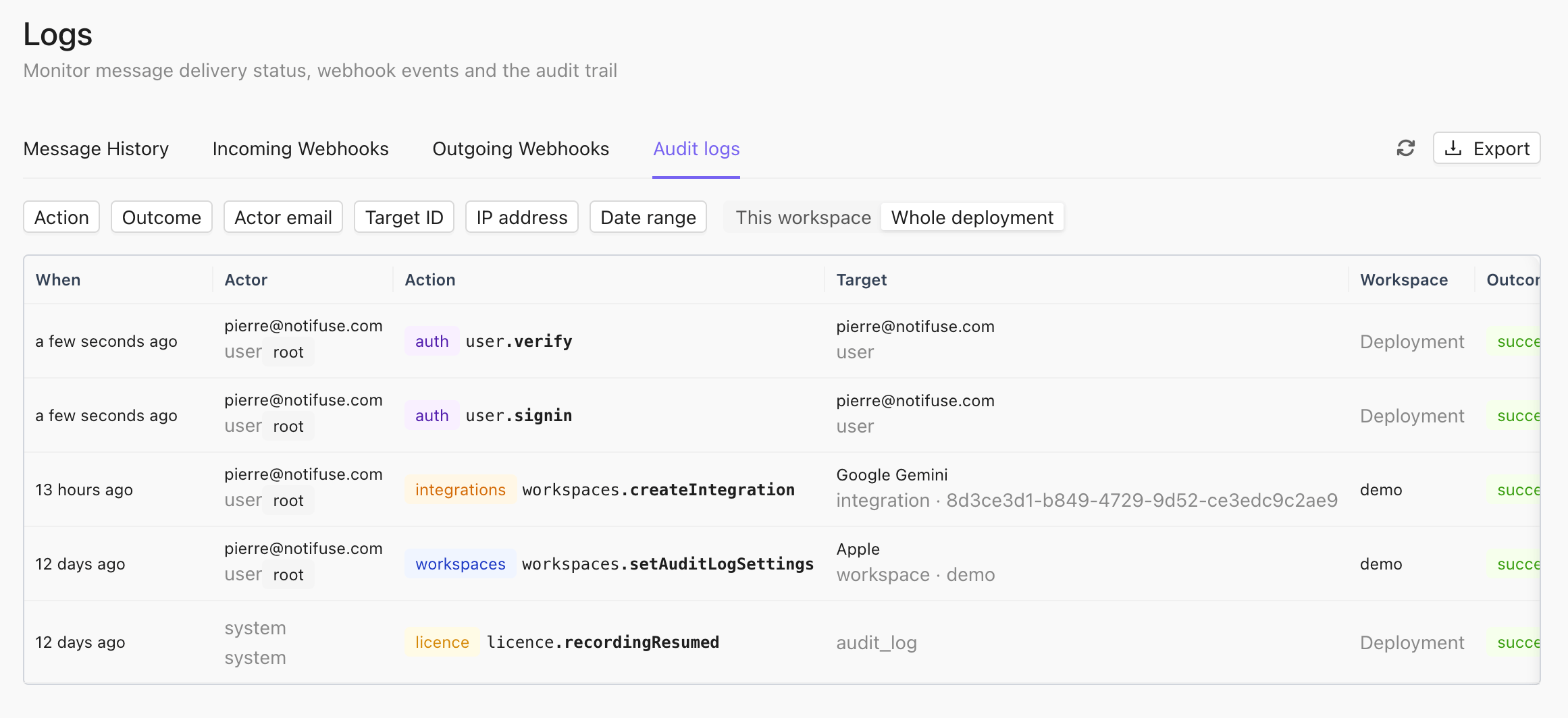
What an entry contains
What is recorded
EveryPOST /api/… route below is recorded under its own name. Reads are not recorded, with one exception: the console’s contact export asks for the first page of contacts.list with export=true, and that request is recorded as contacts.export. An API client paging the list on its own is a read like any other and is not.
GET /api/auditLogs.actions returns this catalogue, which is what the console’s action filter is built from.
Failures are recorded too. A sign-in for an unknown address, a wrong or expired code, a rate-limited attempt: the response gives nothing away, and the entry says why (metadata.reason). A request refused by a permission check is recorded as denied with the resource and permission it lacked; one refused by the licence is denied with the feature it needed.
Not recorded: the data plane (contacts.upsert, customEvents.upsert, transactional.send, lists.subscribe and the other per-contact routes), reads, tests and previews, the internal task endpoints, and a broadcast paused automatically by the circuit breaker — that runs on the send path, which contains no licence check of any kind.
Filtering and export
The page filters by date range, action, outcome, actor email, target id and IP address; the API accepts the same filters pluscategories, actor_id, actor_type and target_type. Pages are cursor-based, newest first.
Export downloads the current filter as CSV or NDJSON, up to 100 000 rows; an export that hits the cap ends with an export.truncated marker row carrying max_rows, so a truncated file never passes for a complete one — narrow the date range and export again. The export is itself recorded as auditLogs.export. Every entry carries an id, and the details drawer has a Copy link button that opens the page on that entry.
Retention
Entries older than the retention are deleted once a day. The default is 365 days; a workspace owner can set the workspace’s own retention in Settings → Audit logs (0 keeps every entry forever, otherwise 30 to 3650 days), and a root user sets the deployment default — which also governs deployment-level entries and the entries of workspaces that no longer exist — in the system settings. Each purge that removed something is recorded asaudit.purged, with the count.
The retention runs in every licence state: deleting data never depends on the licence.
Integrity
The table is append-only: a database trigger refuses everyUPDATE and TRUNCATE, and every DELETE except the ones the retention function performs. No code path in Notifuse rewrites history, and neither does a stray SQL statement run through its database role.
What it does not stop: the owner of the database, or a superuser, who can disable the trigger or drop the table. The guarantee is “the application cannot alter the log”, not “nobody can”. If you need to prove that to an auditor, back the table up out of band on a schedule they accept.
Entries are stored in the system database, not in the workspace’s own database, so deleting a workspace deletes nothing from the log: the record of who deleted it, and of what they did before, survives.
API
The four endpoints are documented in the API reference:auditLogs.list, auditLogs.get, auditLogs.actions and auditLogs.export. An API key can call them when granted the Audit logs read permission, which is how a SIEM pulls the log on a schedule. The retention is set over the API with workspaces.setAuditLogSettings, which only a workspace owner can call — no permission grants it.