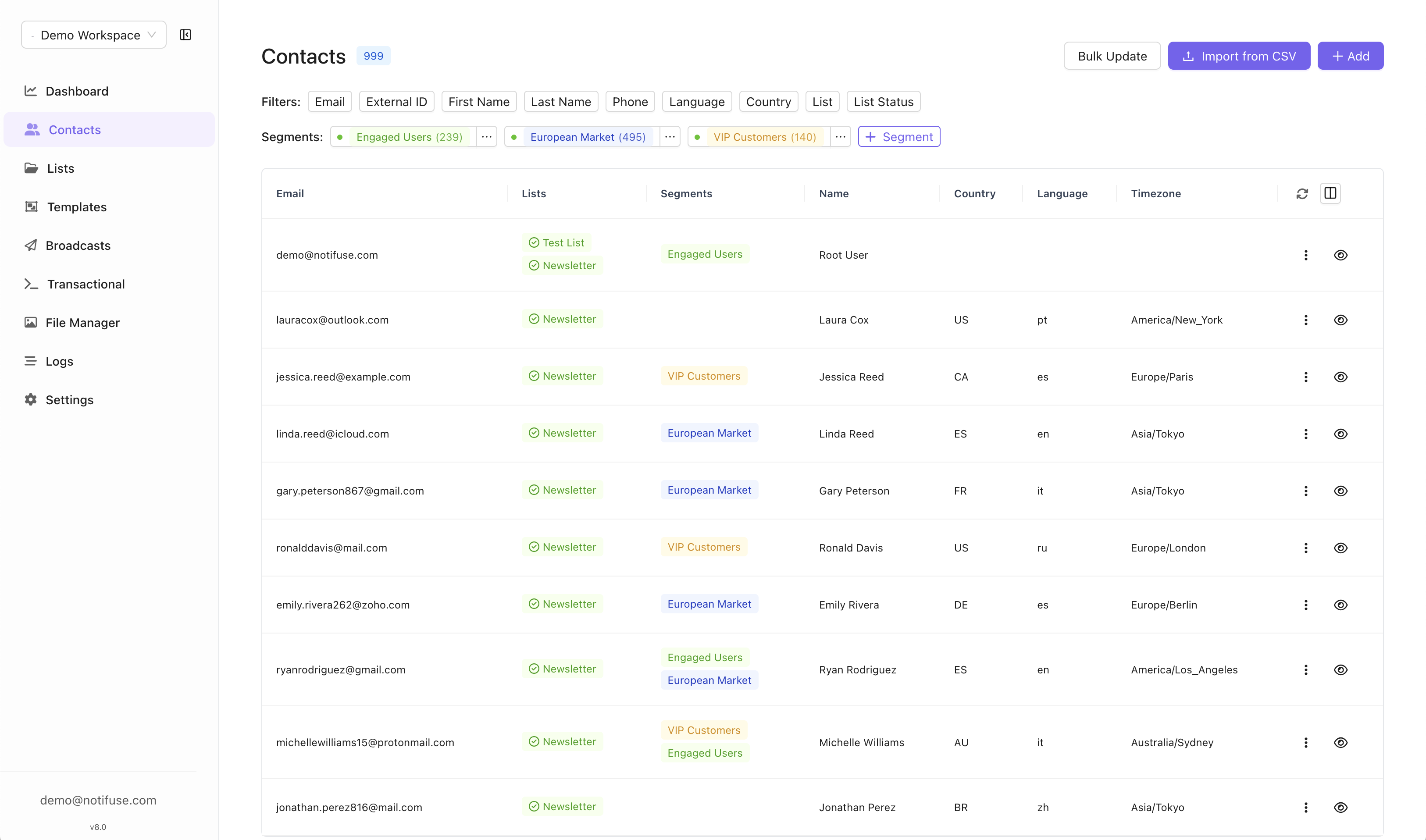
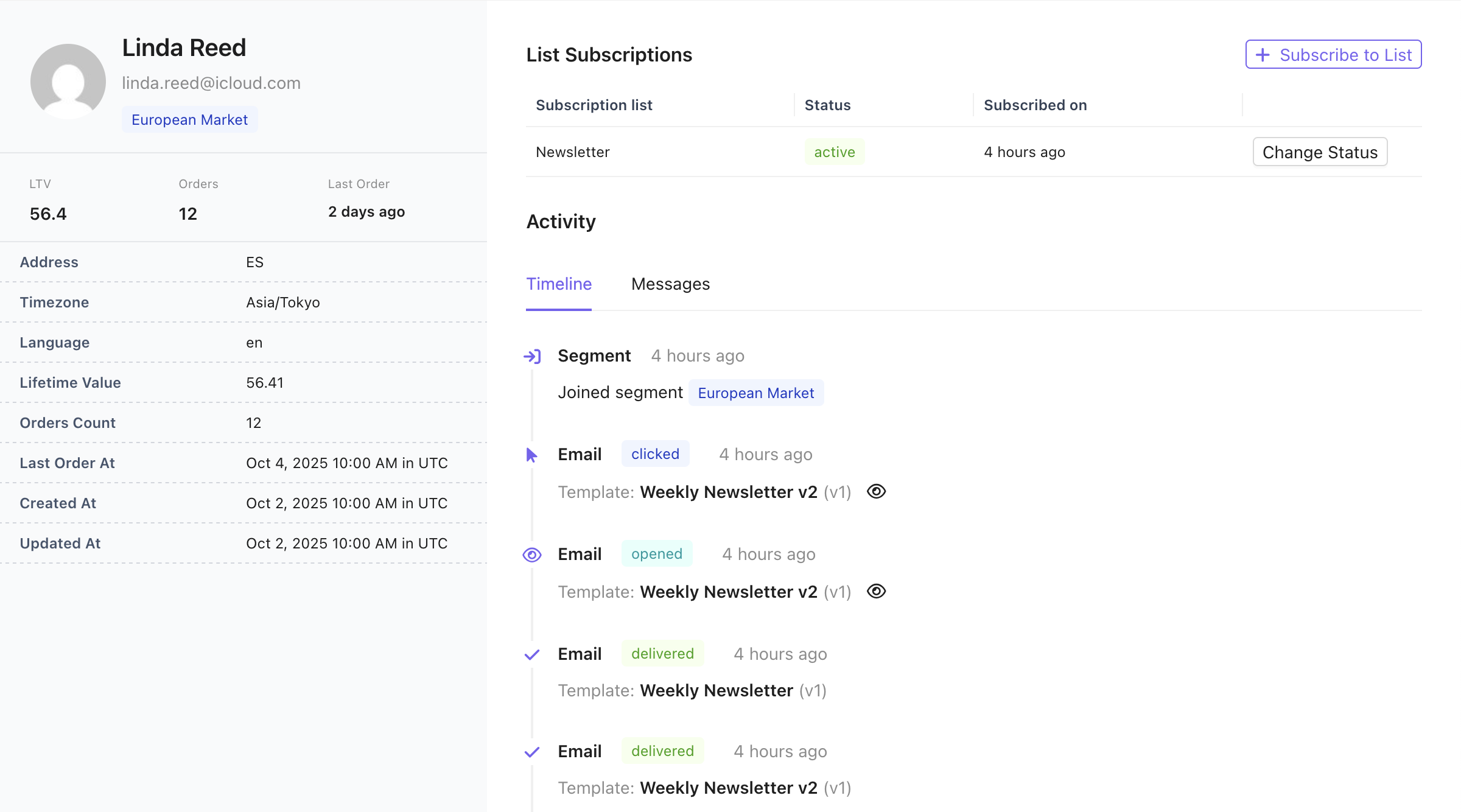
Contacts are the foundation of your email marketing efforts in Notifuse. They represent your subscribers, customers, and prospects, complete with detailed profiles, custom fields, and engagement history.
Contacts in Notifuse are comprehensive customer profiles that store subscriber information, preferences, and engagement data. They support flexible data storage through predefined fields and can be associated with multiple mailing lists.
The email address is the unique identifier of a contact: it is the primary key in the database, and every upsert operation (contacts.upsert, contacts.import, and the contact embedded in transactional.send) matches contacts by email address only:
New emails: Automatically creates a new contact
Existing emails: Updates the existing contact with provided fields
Null values: Setting any field to null removes that value from the contact
external_id is an optional reference to the contact in your own system (for example, your application’s user ID). It is stored, searchable, and returned by the API, but it is not a unique key:
It is never used to match contacts during upserts.
Notifuse does not prevent several contacts from sharing the same external_id.
If several contacts share the same external_id, contacts.getByExternalID returns only one of them (which one is not defined).
Because the email address is the contact’s identity, upserting the same external_id with a new email address creates a second contact — it does not update the email of the existing one. When a user changes their email address in your system:
Fetch the old contact with contacts.getByEmail to retrieve its profile and its list subscriptions with their statuses.
Upsert a contact with the new email address, sending the full profile (upserts merge fields, so include every field you want to keep, such as external_id, names, and custom fields).
Re-create the list subscriptions on the new contact with lists.subscribe.
Delete the contact with the old email address using contacts.delete.
Preserve opt-out statuses when re-creating subscriptions. If the old contact had unsubscribed,
bounced, or complained on a list, do not re-subscribe the new email address to that list:
the new contact starts with a clean slate, and blindly re-subscribing silently resets an
opt-out — a consent violation (GDPR / CAN-SPAM) that can hurt your sender reputation.
Also keep in mind:
Message history and segment memberships are keyed to the email address. They stay attached to the old email address and are not transferred to the new contact.
Active automations: deleting the old contact drops it from any automation it is currently progressing through; the new contact does not resume its position.
Deleting a contact with contacts.delete also deletes its list subscriptions, unsubscribed, bounced and complained statuses included, so Notifuse no longer remembers that the address opted out. A later import, upsert with subscribe_to_lists or lists.subscribe adds the address back as a new, subscribed contact. To keep honouring an opt-out, set the contact’s list status to unsubscribed instead of deleting it.An unsubscribe link in an email sent before the deletion still answers successfully, but stores nothing about the address.
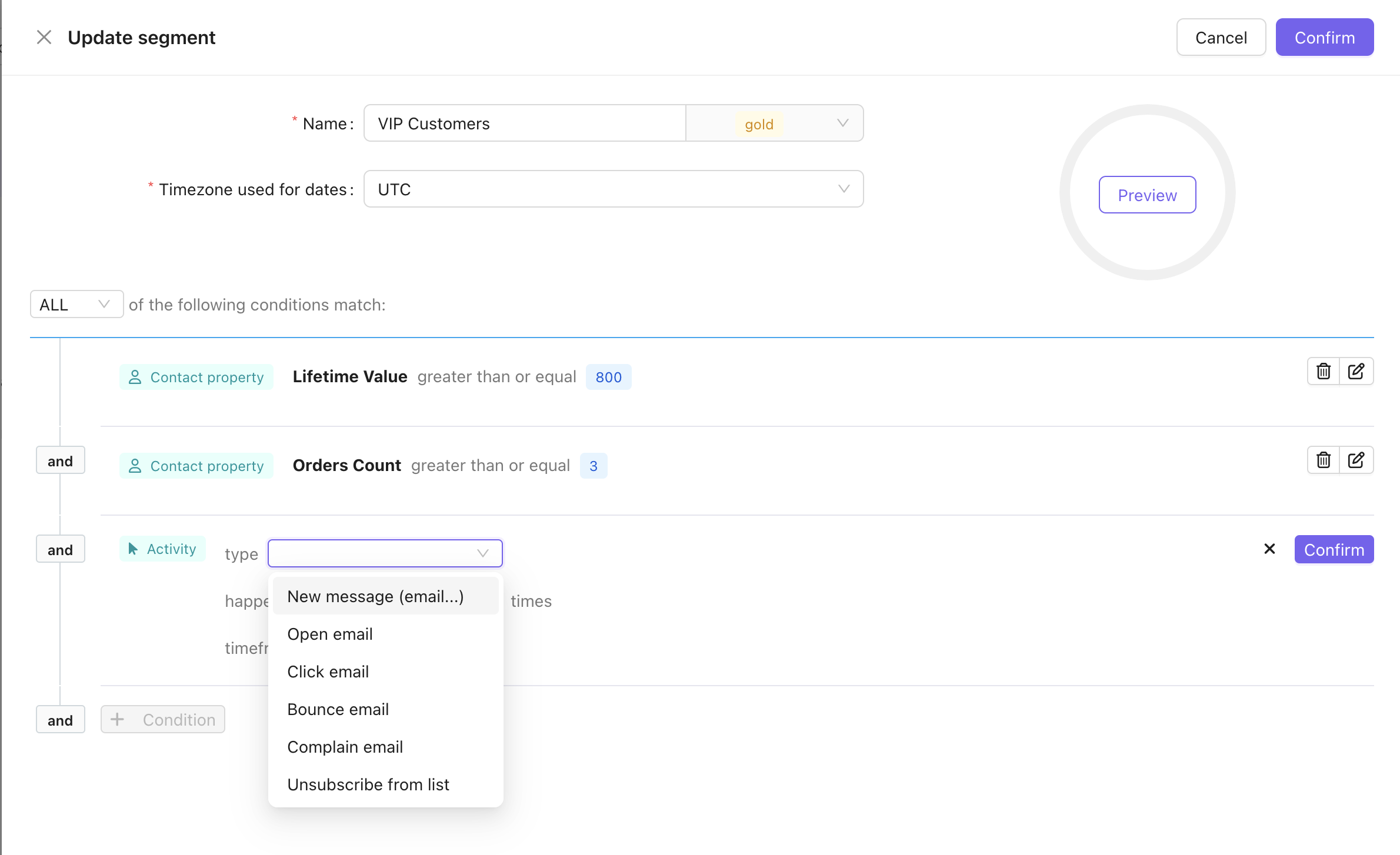
Notifuse includes a powerful real-time contact segmentation engine that allows you to create dynamic audience segments based on contact properties and engagement behavior. Segments automatically update as contact data changes, ensuring your targeting remains accurate and current.
The segmentation engine leverages contact timeline data introduced in version 7.0, which tracks all contact interactions including messages, webhook events, and profile mutations. Activity events include granular kind field types (e.g., email.opened, email.clicked, web.pageview) enabling precise behavioral targeting. All timestamps are stored in UTC timezone and can be evaluated in user-specified timezones for date-based conditions.
Segments have their own Segments permission: read lists segments and opens one, write creates, edits, deletes and rebuilds them, and runs, resets or deletes their background build tasks.Previewing a segment while you build it, and listing the contacts a segment currently matches, additionally require the Contacts read permission — both answer questions about your contacts rather than about the segment definition. A member holding Segments read alone can work with segment definitions, but not see who is in them.Preview accepts any definition sent to it, not just a saved segment. Someone holding Segments read together with Contacts read can therefore ask counting questions about any contact attribute, list membership, custom event or timeline entry, one count at a time.
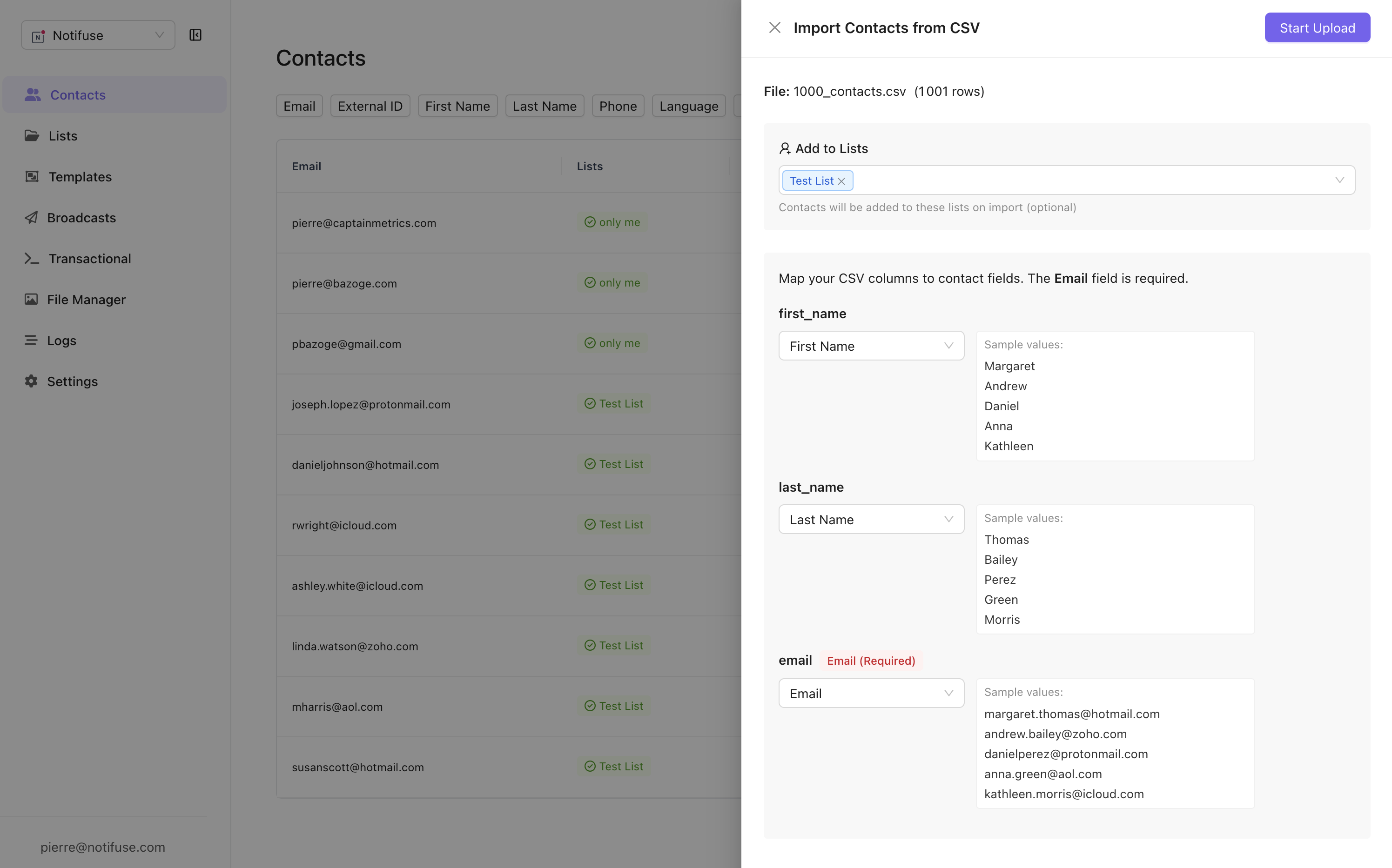
Notifuse provides a powerful CSV import feature that streamlines the process of adding multiple contacts to your workspace. The import system is designed to be intuitive and robust, handling large datasets efficiently.
The CSV importer automatically detects and suggests field mappings based on your CSV column headers. Common column names like “email”, “first_name”, “last_name”, and “phone” are automatically matched to their corresponding contact fields. For custom or non-standard column names, you can manually map each CSV column to the appropriate contact field through an intuitive interface.
During the import process, you can select one or multiple mailing lists to add your contacts to. This allows you to immediately segment your imported contacts and ensures they’re properly organized within your workspace. All imported contacts will be automatically subscribed to the selected lists upon successful import.
The import process includes automatic progress saving, which means if your import is interrupted due to network issues or browser closure, you can resume from where you left off. This is particularly valuable when importing large CSV files with thousands of contacts, ensuring no data is lost during the process.
Importing needs the Contacts write permission. Selecting one or more mailing lists during the import needs Lists write as well.Bear in mind what an import does: every field a row carries overwrites the stored value on the matching contact. A single import can rewrite your whole contact database, so treat Contacts write as that level of access rather than as “can add contacts”.
Read covers contact records and their full profiles, the contact timeline, and the custom events recorded against contacts. It is also required — alongside the matching Lists or Segments grant — to enumerate the addresses inside a list or a segment, and to set cc or bcc on a transactional send.
Write covers creating and updating contacts, deleting them, bulk-overwriting them through a CSV or API import, and recording custom events. Changing a contact’s subscription status on a list needs Lists write as well.
Write is not “can add contacts”: it deletes permanently, and it overwrites in bulk.Three grants reach contact data without Contacts write, which is worth knowing before you hand any of them out:
Lists write on its own creates or overwrites a complete contact record. Subscribing an address through /api/lists.subscribe writes every field the request carries, and can subscribe someone to a list that is not public.
Automations write sends the complete contact record to any URL a webhook node names, and nothing checks permissions while an automation runs.
Transactional write creates the recipient contact as part of sending. Without Contacts write, only the email address is stored and an existing contact is never modified — see Transactional API.
Flexible Schema: Predefined fields cover most use cases while custom fields provide extensibility
Automatic Deduplication: Email-based upserts prevent duplicate contacts for the same email address
Multi-List Support: Single contact can belong to multiple mailing lists
Data Removal: Explicit null handling for field cleanup
{"docsConfig":{"theme":"mint","$schema":"https://mintlify.com/docs.json","name":"Notifuse Documentation","colors":{"primary":"#7763F1","light":"#7763F1","dark":"#7763F1"},"logo":{"light":"https://mintcdn.com/notifuse/Gw4P7NadUImyvZfw/assets/logo/logo-small.png?fit=max\u0026auto=format\u0026n=Gw4P7NadUImyvZfw\u0026q=85\u0026s=3f27c94b7162528f7c2d50f0d0dffdc4","dark":"https://mintcdn.com/notifuse/Gw4P7NadUImyvZfw/assets/logo/logo-small.png?fit=max\u0026auto=format\u0026n=Gw4P7NadUImyvZfw\u0026q=85\u0026s=3f27c94b7162528f7c2d50f0d0dffdc4","href":"https://notifuse.com"},"favicon":"https://mintcdn.com/notifuse/Gw4P7NadUImyvZfw/assets/logo/icon.png?fit=max\u0026auto=format\u0026n=Gw4P7NadUImyvZfw\u0026q=85\u0026s=4747c87b24b335428a3813ddeddb25c6","appearance":{"default":"light","strict":true},"navbar":{"links":[{"href":"mailto:hello@notifuse.com","label":"Support"},{"href":"https://github.com/notifuse","label":"GitHub"}],"primary":{"type":"button","label":"Try Notifuse Cloud","href":"https://cloud.notifuse.com"}},"footer":{"socials":{"x":"https://x.com/notifuse","github":"https://github.com/notifuse"}},"styling":{"latex":true},"navigation":{"pages":[]}},"deployment":{"deploymentMetadataValue":{"subdomain":"notifuse","hasAudioNarration":false,"actualSubdomain":"notifuse","customDomains":["docs.notifuse.com"],"gitSource":{"type":"github","owner":"notifuse","repo":"docs","deployBranch":"main","contentDirectory":"","isPrivate":true,"mountPath":"","label":""},"chroma":{"liveDeploymentHistoryId":"6adb682800bf4036f5c4e610","collectionId":"b70e365b-99a3-462d-b179-b943298f5aee","schemaVersion":"v3","latestBuiltDeploymentHistoryId":"6adb682800bf4036f5c4e610"},"entitlements":{},"buildId":"6adb682800bf4036f5c4e610","clientVersion":"0.0.3939","searchFilterCounts":[{"language":"default","tag":"API Reference","count":74},{"language":"default","tag":"Documentation","count":40},{"language":"default","tag":"Features","count":25},{"language":"default","tag":"Blog","count":21},{"language":"default","tag":"Web Analytics","count":17},{"language":"default","tag":"Broadcasts","count":12},{"language":"default","tag":"Webhooks","count":10},{"language":"default","tag":"Self-hosting","count":8},{"language":"default","tag":"Email Providers","count":7},{"language":"default","tag":"Contacts","count":7}]},"assistantConfig":{},"hasChatPermissions":false,"hasWebMcpPermissions":false,"toggles":[{"name":"kill-isr","enabled":true,"variant":{"name":"disabled","enabled":false,"feature_enabled":true},"impressionData":false},{"name":"agent-mintlify-slack","enabled":true,"variant":{"name":"disabled","enabled":false,"feature_enabled":true},"impressionData":false},{"name":"editor-v7-file-tree","enabled":true,"variant":{"name":"disabled","enabled":false,"feature_enabled":true},"impressionData":false},{"name":"agent-integrations-settings","enabled":true,"variant":{"name":"disabled","enabled":false,"feature_enabled":true},"impressionData":false},{"name":"automations-pr-grouping","enabled":true,"variant":{"name":"disabled","enabled":false,"feature_enabled":true},"impressionData":false},{"name":"custom-prefix","enabled":true,"variant":{"name":"disabled","enabled":false,"feature_enabled":true},"impressionData":false},{"name":"analytics-v7","enabled":true,"variant":{"name":"disabled","enabled":false,"feature_enabled":true},"impressionData":false},{"name":"user-flows-analytics","enabled":true,"variant":{"name":"disabled","enabled":false,"feature_enabled":true},"impressionData":false},{"name":"no-publish-flow","enabled":true,"variant":{"name":"disabled","enabled":false,"feature_enabled":true},"impressionData":false},{"name":"workos-onboarding","enabled":true,"variant":{"name":"disabled","enabled":false,"feature_enabled":true},"impressionData":false},{"name":"llms-txt-v2","enabled":true,"variant":{"name":"disabled","enabled":false,"feature_enabled":true},"impressionData":false},{"name":"pause-universal-search-reconcile","enabled":true,"variant":{"name":"disabled","enabled":false,"feature_enabled":true},"impressionData":false},{"name":"snapshot-serving-live","enabled":true,"variant":{"name":"disabled","enabled":false,"feature_enabled":true},"impressionData":false},{"name":"stripTemperatureMiddleware","enabled":true,"variant":{"name":"disabled","enabled":false,"feature_enabled":true},"impressionData":false},{"name":"per-site-search-delta","enabled":true,"variant":{"name":"disabled","enabled":false,"feature_enabled":true},"impressionData":false},{"name":"support-platform-pylon-zendesk","enabled":true,"variant":{"name":"disabled","enabled":false,"feature_enabled":true},"impressionData":false},{"name":"snapshot-serving","enabled":true,"variant":{"name":"disabled","enabled":false,"feature_enabled":true},"impressionData":false},{"name":"instant-rollback","enabled":true,"variant":{"name":"disabled","enabled":false,"feature_enabled":true},"impressionData":false},{"name":"granular-notifications-server","enabled":true,"variant":{"name":"disabled","enabled":false,"feature_enabled":true},"impressionData":false},{"name":"granular-notifications","enabled":true,"variant":{"name":"disabled","enabled":false,"feature_enabled":true},"impressionData":false},{"name":"editor-private-page-search","enabled":true,"variant":{"name":"disabled","enabled":false,"feature_enabled":true},"impressionData":false},{"name":"automations-fable","enabled":true,"variant":{"name":"disabled","enabled":false,"feature_enabled":true},"impressionData":false},{"name":"fixed-ai-action-pricing","enabled":true,"variant":{"name":"disabled","enabled":false,"feature_enabled":true},"impressionData":false},{"name":"automation-resolve-merge-conflict","enabled":true,"variant":{"name":"disabled","enabled":false,"feature_enabled":true},"impressionData":false},{"name":"scoped-publishing","enabled":true,"variant":{"name":"disabled","enabled":false,"feature_enabled":true},"impressionData":false},{"name":"mintql","enabled":true,"variant":{"name":"disabled","enabled":false,"feature_enabled":true},"impressionData":false},{"name":"page-level-analytics","enabled":true,"variant":{"name":"disabled","enabled":false,"feature_enabled":true},"impressionData":false},{"name":"editor-version-history-v2","enabled":true,"variant":{"name":"disabled","enabled":false,"feature_enabled":true},"impressionData":false},{"name":"editor-nav-generations","enabled":true,"variant":{"name":"disabled","enabled":false,"feature_enabled":true},"impressionData":false},{"name":"billing-page-v2","enabled":true,"variant":{"name":"disabled","enabled":false,"feature_enabled":true},"impressionData":false},{"name":"workspace-projects","enabled":true,"variant":{"name":"disabled","enabled":false,"feature_enabled":true},"impressionData":false},{"name":"assistant-v5","enabled":true,"variant":{"name":"disabled","enabled":false,"feature_enabled":true},"impressionData":false},{"name":"byok-sep-25","enabled":true,"variant":{"name":"disabled","enabled":false,"feature_enabled":true},"impressionData":false},{"name":"fork-pr-previews","enabled":true,"variant":{"name":"disabled","enabled":false,"feature_enabled":true},"impressionData":false},{"name":"revalidation-jwt","enabled":true,"variant":{"name":"disabled","enabled":false,"feature_enabled":true},"impressionData":false},{"name":"vite-origin","enabled":true,"variant":{"name":"disabled","enabled":false,"feature_enabled":true},"impressionData":false},{"name":"editor-agent-model-picker","enabled":true,"variant":{"name":"disabled","enabled":false,"feature_enabled":true},"impressionData":false},{"name":"billing-updated-9-15","enabled":true,"variant":{"name":"disabled","enabled":false,"feature_enabled":true},"impressionData":false},{"name":"hobby-abuse-scan","enabled":true,"variant":{"name":"disabled","enabled":false,"feature_enabled":true},"impressionData":false},{"name":"dashboard-inbox","enabled":true,"variant":{"name":"disabled","enabled":false,"feature_enabled":true},"impressionData":false}],"isAtlas":false,"googleFontsInlined":false},"customCss":[],"page":{"pagePath":"features/contacts","slug":"/features/contacts","pageMetadata":{"title":"Contacts","description":"Contacts are the foundation of your email marketing efforts in Notifuse. They represent your subscribers, customers, and prospects, complete with detailed profiles, custom fields, and engagement history.","href":"/features/contacts"},"description":{"compiledSource":"\"use strict\";\nconst {jsx: _jsx} = arguments[0];\nconst {useMDXComponents: _provideComponents} = arguments[0];\nfunction _createMdxContent(props) {\n const _components = {\n p: \"p\",\n ..._provideComponents(),\n ...props.components\n };\n return _jsx(_components.p, {\n children: \"Contacts are the foundation of your email marketing efforts in Notifuse. They represent your subscribers, customers, and prospects, complete with detailed profiles, custom fields, and engagement history.\"\n });\n}\nfunction MDXContent(props = {}) {\n const {wrapper: MDXLayout} = {\n ..._provideComponents(),\n ...props.components\n };\n return MDXLayout ? _jsx(MDXLayout, {\n ...props,\n children: _jsx(_createMdxContent, {\n ...props\n })\n }) : _createMdxContent(props);\n}\nreturn {\n default: MDXContent\n};\n","frontmatter":{},"scope":{}},"pageType":"default","mdx":{"mdxSource":{"compiledSource":"\"use strict\";const{Fragment:_Fragment,jsx:_jsx,jsxs:_jsxs}=arguments[0];const{useMDXComponents:_provideComponents}=arguments[0];function _createMdxContent(props){const _components={a:`a`,code:`code`,li:`li`,ol:`ol`,p:`p`,strong:`strong`,tbody:`tbody`,td:`td`,th:`th`,thead:`thead`,tr:`tr`,ul:`ul`,..._provideComponents(),...props.components},{Heading,OptimizedImage,Table,Warning}=_components;if(!Heading)_missingMdxReference(`Heading`,true);if(!OptimizedImage)_missingMdxReference(`OptimizedImage`,true);if(!Table)_missingMdxReference(`Table`,true);if(!Warning)_missingMdxReference(`Warning`,true);return _jsxs(_Fragment,{children:[_jsx(OptimizedImage,{src:`https://mintcdn.com/notifuse/cx9hphIF3-dOnj5d/assets/screenshots/contacts.png?fit=max\u0026auto=format\u0026n=cx9hphIF3-dOnj5d\u0026q=85\u0026s=771a90d7f1cad82335c3392fd3716ed4`,alt:`Contacts interface showing contact list with various fields and custom data options`,\"data-og-width\":`3252`,width:`3252`,\"data-og-height\":`1916`,height:`1916`,\"data-path\":`assets/screenshots/contacts.png`,\"data-optimize\":`true`,\"data-opv\":`3`,srcset:`https://mintcdn.com/notifuse/cx9hphIF3-dOnj5d/assets/screenshots/contacts.png?w=280\u0026fit=max\u0026auto=format\u0026n=cx9hphIF3-dOnj5d\u0026q=85\u0026s=9cb090e4cf9a48af2c54710cb2b53e4c 280w, https://mintcdn.com/notifuse/cx9hphIF3-dOnj5d/assets/screenshots/contacts.png?w=560\u0026fit=max\u0026auto=format\u0026n=cx9hphIF3-dOnj5d\u0026q=85\u0026s=973c0ee3c363679fcfad4142888a4d0f 560w, https://mintcdn.com/notifuse/cx9hphIF3-dOnj5d/assets/screenshots/contacts.png?w=840\u0026fit=max\u0026auto=format\u0026n=cx9hphIF3-dOnj5d\u0026q=85\u0026s=fa2c6d5a1a474f2456863ce826bdd776 840w, https://mintcdn.com/notifuse/cx9hphIF3-dOnj5d/assets/screenshots/contacts.png?w=1100\u0026fit=max\u0026auto=format\u0026n=cx9hphIF3-dOnj5d\u0026q=85\u0026s=9e3fa2eb7c73098f21b59e377500b335 1100w, https://mintcdn.com/notifuse/cx9hphIF3-dOnj5d/assets/screenshots/contacts.png?w=1650\u0026fit=max\u0026auto=format\u0026n=cx9hphIF3-dOnj5d\u0026q=85\u0026s=26aa10426b6115471a5bfb5906bfa951 1650w, https://mintcdn.com/notifuse/cx9hphIF3-dOnj5d/assets/screenshots/contacts.png?w=2500\u0026fit=max\u0026auto=format\u0026n=cx9hphIF3-dOnj5d\u0026q=85\u0026s=a20c3a4a0d41acb8ccf708c8fa188ab5 2500w`}),`\n`,_jsx(Heading,{level:`2`,id:`overview`,children:`Overview`}),`\n`,_jsx(_components.p,{children:`Contacts in Notifuse are comprehensive customer profiles that store subscriber information, preferences, and engagement data. They support flexible data storage through predefined fields and can be associated with multiple mailing lists.`}),`\n`,_jsx(Heading,{level:`2`,id:`contact-fields`,children:`Contact Fields`}),`\n`,_jsxs(Table,{children:[_jsx(_components.thead,{children:_jsxs(_components.tr,{children:[_jsx(_components.th,{children:`Field`}),_jsx(_components.th,{children:`Type`}),_jsx(_components.th,{children:`Description`})]})}),_jsxs(_components.tbody,{children:[_jsxs(_components.tr,{children:[_jsx(_components.td,{children:_jsx(_components.code,{children:`email`})}),_jsx(_components.td,{children:`String`}),_jsxs(_components.td,{children:[`Contact’s email address — the contact’s unique identifier (`,_jsx(_components.strong,{children:`Required`}),`)`]})]}),_jsxs(_components.tr,{children:[_jsx(_components.td,{children:_jsx(_components.code,{children:`external_id`})}),_jsx(_components.td,{children:`String`}),_jsxs(_components.td,{children:[`Optional reference to the contact in your own system. Not unique — see `,_jsx(_components.a,{href:`#contact-identity-and-upsert-behavior`,children:`Contact Identity`})]})]}),_jsxs(_components.tr,{children:[_jsx(_components.td,{children:_jsx(_components.code,{children:`first_name`})}),_jsx(_components.td,{children:`String`}),_jsx(_components.td,{children:`Contact’s first name`})]}),_jsxs(_components.tr,{children:[_jsx(_components.td,{children:_jsx(_components.code,{children:`last_name`})}),_jsx(_components.td,{children:`String`}),_jsx(_components.td,{children:`Contact’s last name`})]}),_jsxs(_components.tr,{children:[_jsx(_components.td,{children:_jsx(_components.code,{children:`phone`})}),_jsx(_components.td,{children:`String`}),_jsx(_components.td,{children:`Phone number`})]}),_jsxs(_components.tr,{children:[_jsx(_components.td,{children:_jsx(_components.code,{children:`timezone`})}),_jsx(_components.td,{children:`String`}),_jsx(_components.td,{children:`Contact’s ISO timezone`})]}),_jsxs(_components.tr,{children:[_jsx(_components.td,{children:_jsx(_components.code,{children:`language`})}),_jsx(_components.td,{children:`String`}),_jsx(_components.td,{children:`Preferred language`})]}),_jsxs(_components.tr,{children:[_jsx(_components.td,{children:_jsx(_components.code,{children:`job_title`})}),_jsx(_components.td,{children:`String`}),_jsx(_components.td,{children:`Professional title`})]}),_jsxs(_components.tr,{children:[_jsx(_components.td,{children:_jsx(_components.code,{children:`address_line_1`})}),_jsx(_components.td,{children:`String`}),_jsx(_components.td,{children:`Primary address`})]}),_jsxs(_components.tr,{children:[_jsx(_components.td,{children:_jsx(_components.code,{children:`address_line_2`})}),_jsx(_components.td,{children:`String`}),_jsx(_components.td,{children:`Secondary address (apartment, suite, etc.)`})]}),_jsxs(_components.tr,{children:[_jsx(_components.td,{children:_jsx(_components.code,{children:`country`})}),_jsx(_components.td,{children:`String`}),_jsx(_components.td,{children:`Country ISO format`})]}),_jsxs(_components.tr,{children:[_jsx(_components.td,{children:_jsx(_components.code,{children:`state`})}),_jsx(_components.td,{children:`String`}),_jsx(_components.td,{children:`State or province`})]}),_jsxs(_components.tr,{children:[_jsx(_components.td,{children:_jsx(_components.code,{children:`postcode`})}),_jsx(_components.td,{children:`String`}),_jsx(_components.td,{children:`Postal/ZIP code`})]}),_jsxs(_components.tr,{children:[_jsxs(_components.td,{children:[_jsx(_components.code,{children:`custom_string_1`}),` to `,_jsx(_components.code,{children:`custom_string_5`})]}),_jsx(_components.td,{children:`String`}),_jsx(_components.td,{children:`Custom string fields`})]}),_jsxs(_components.tr,{children:[_jsxs(_components.td,{children:[_jsx(_components.code,{children:`custom_number_1`}),` to `,_jsx(_components.code,{children:`custom_number_5`})]}),_jsx(_components.td,{children:`Number`}),_jsx(_components.td,{children:`Custom number fields`})]}),_jsxs(_components.tr,{children:[_jsxs(_components.td,{children:[_jsx(_components.code,{children:`custom_datetime_1`}),` to `,_jsx(_components.code,{children:`custom_datetime_5`})]}),_jsx(_components.td,{children:`DateTime`}),_jsx(_components.td,{children:`Custom datetime fields`})]}),_jsxs(_components.tr,{children:[_jsxs(_components.td,{children:[_jsx(_components.code,{children:`custom_json_1`}),` to `,_jsx(_components.code,{children:`custom_json_5`})]}),_jsx(_components.td,{children:`JSON`}),_jsx(_components.td,{children:`Custom JSON fields`})]})]})]}),`\n`,_jsx(OptimizedImage,{src:`https://mintcdn.com/notifuse/qV98kg5DEVemR5hs/assets/screenshots/contact_profile.png?fit=max\u0026auto=format\u0026n=qV98kg5DEVemR5hs\u0026q=85\u0026s=6865e39ca50be3cf7bd70c1b6b3f86c0`,alt:`Profile of a contact`,\"data-og-width\":`2400`,width:`2400`,\"data-og-height\":`1334`,height:`1334`,\"data-path\":`assets/screenshots/contact_profile.png`,\"data-optimize\":`true`,\"data-opv\":`3`,srcset:`https://mintcdn.com/notifuse/qV98kg5DEVemR5hs/assets/screenshots/contact_profile.png?w=280\u0026fit=max\u0026auto=format\u0026n=qV98kg5DEVemR5hs\u0026q=85\u0026s=ea37b58de7ef4d64527df5d28b3dbb74 280w, https://mintcdn.com/notifuse/qV98kg5DEVemR5hs/assets/screenshots/contact_profile.png?w=560\u0026fit=max\u0026auto=format\u0026n=qV98kg5DEVemR5hs\u0026q=85\u0026s=4b387cbcbde76fa0894f3406b9d1f7ca 560w, https://mintcdn.com/notifuse/qV98kg5DEVemR5hs/assets/screenshots/contact_profile.png?w=840\u0026fit=max\u0026auto=format\u0026n=qV98kg5DEVemR5hs\u0026q=85\u0026s=8660083d33cc056c2b8bed6d28402e35 840w, https://mintcdn.com/notifuse/qV98kg5DEVemR5hs/assets/screenshots/contact_profile.png?w=1100\u0026fit=max\u0026auto=format\u0026n=qV98kg5DEVemR5hs\u0026q=85\u0026s=ba3e28978f30877ee37f40cdcda708a2 1100w, https://mintcdn.com/notifuse/qV98kg5DEVemR5hs/assets/screenshots/contact_profile.png?w=1650\u0026fit=max\u0026auto=format\u0026n=qV98kg5DEVemR5hs\u0026q=85\u0026s=9db1bf7f1abfb3712cc3f68b57e0e9ba 1650w, https://mintcdn.com/notifuse/qV98kg5DEVemR5hs/assets/screenshots/contact_profile.png?w=2500\u0026fit=max\u0026auto=format\u0026n=qV98kg5DEVemR5hs\u0026q=85\u0026s=54ca3d00deef8dd894bb2e6c75d1468b 2500w`}),`\n`,_jsx(Heading,{level:`2`,id:`contact-management`,children:`Contact Management`}),`\n`,_jsx(Heading,{level:`3`,id:`contact-identity-and-upsert-behavior`,children:`Contact Identity and Upsert Behavior`}),`\n`,_jsxs(_components.p,{children:[`The `,_jsx(_components.strong,{children:`email address is the unique identifier of a contact`}),`: it is the primary key in the database, and every upsert operation (`,_jsx(_components.code,{children:`contacts.upsert`}),`, `,_jsx(_components.code,{children:`contacts.import`}),`, and the contact embedded in `,_jsx(_components.code,{children:`transactional.send`}),`) matches contacts by email address only:`]}),`\n`,_jsxs(_components.ul,{children:[`\n`,_jsxs(_components.li,{children:[_jsx(_components.strong,{children:`New emails`}),`: Automatically creates a new contact`]}),`\n`,_jsxs(_components.li,{children:[_jsx(_components.strong,{children:`Existing emails`}),`: Updates the existing contact with provided fields`]}),`\n`,_jsxs(_components.li,{children:[_jsx(_components.strong,{children:`Null values`}),`: Setting any field to `,_jsx(_components.code,{children:`null`}),` removes that value from the contact`]}),`\n`]}),`\n`,_jsxs(_components.p,{children:[_jsx(_components.code,{children:`external_id`}),` is an optional reference to the contact in your own system (for example, your application’s user ID). It is stored, searchable, and returned by the API, but it is `,_jsx(_components.strong,{children:`not a unique key`}),`:`]}),`\n`,_jsxs(_components.ul,{children:[`\n`,_jsx(_components.li,{children:`It is never used to match contacts during upserts.`}),`\n`,_jsxs(_components.li,{children:[`Notifuse does not prevent several contacts from sharing the same `,_jsx(_components.code,{children:`external_id`}),`.`]}),`\n`,_jsxs(_components.li,{children:[`If several contacts share the same `,_jsx(_components.code,{children:`external_id`}),`, `,_jsx(_components.code,{children:`contacts.getByExternalID`}),` returns only one of them (which one is not defined).`]}),`\n`]}),`\n`,_jsx(Heading,{level:`3`,id:`changing-a-contact’s-email-address`,children:`Changing a Contact’s Email Address`}),`\n`,_jsxs(_components.p,{children:[`Because the email address is the contact’s identity, upserting the same `,_jsx(_components.code,{children:`external_id`}),` with a new email address `,_jsx(_components.strong,{children:`creates a second contact`}),` — it does not update the email of the existing one. When a user changes their email address in your system:`]}),`\n`,_jsxs(_components.ol,{children:[`\n`,_jsxs(_components.li,{children:[`Fetch the old contact with `,_jsx(_components.code,{children:`contacts.getByEmail`}),` to retrieve its profile and its list subscriptions with their statuses.`]}),`\n`,_jsxs(_components.li,{children:[`Upsert a contact with the `,_jsx(_components.strong,{children:`new`}),` email address, sending the full profile (upserts merge fields, so include every field you want to keep, such as `,_jsx(_components.code,{children:`external_id`}),`, names, and custom fields).`]}),`\n`,_jsxs(_components.li,{children:[`Re-create the list subscriptions on the new contact with `,_jsx(_components.code,{children:`lists.subscribe`}),`.`]}),`\n`,_jsxs(_components.li,{children:[`Delete the contact with the `,_jsx(_components.strong,{children:`old`}),` email address using `,_jsx(_components.code,{children:`contacts.delete`}),`.`]}),`\n`]}),`\n`,_jsx(Warning,{children:_jsxs(_components.p,{children:[`Preserve opt-out statuses when re-creating subscriptions. If the old contact had unsubscribed,\nbounced, or complained on a list, do `,_jsx(_components.strong,{children:`not`}),` re-subscribe the new email address to that list:\nthe new contact starts with a clean slate, and blindly re-subscribing silently resets an\nopt-out — a consent violation (GDPR / CAN-SPAM) that can hurt your sender reputation.`]})}),`\n`,_jsx(_components.p,{children:`Also keep in mind:`}),`\n`,_jsxs(_components.ul,{children:[`\n`,_jsxs(_components.li,{children:[_jsx(_components.strong,{children:`Message history and segment memberships`}),` are keyed to the email address. They stay attached to the old email address and are not transferred to the new contact.`]}),`\n`,_jsxs(_components.li,{children:[_jsx(_components.strong,{children:`Active automations`}),`: deleting the old contact drops it from any automation it is currently progressing through; the new contact does not resume its position.`]}),`\n`]}),`\n`,_jsx(Heading,{level:`3`,id:`deleting-a-contact`,children:`Deleting a Contact`}),`\n`,_jsxs(_components.p,{children:[`Deleting a contact with `,_jsx(_components.code,{children:`contacts.delete`}),` also deletes its list subscriptions, unsubscribed, bounced and complained statuses included, so Notifuse no longer remembers that the address opted out. A later import, upsert with `,_jsx(_components.code,{children:`subscribe_to_lists`}),` or `,_jsx(_components.code,{children:`lists.subscribe`}),` adds the address back as a new, subscribed contact. To keep honouring an opt-out, set the contact’s list status to unsubscribed instead of deleting it.`]}),`\n`,_jsx(_components.p,{children:`An unsubscribe link in an email sent before the deletion still answers successfully, but stores nothing about the address.`}),`\n`,_jsx(Heading,{level:`3`,id:`list-subscriptions`,children:`List Subscriptions`}),`\n`,_jsxs(_components.ul,{children:[`\n`,_jsx(_components.li,{children:`Contacts can subscribe to one or multiple mailing lists`}),`\n`,_jsx(_components.li,{children:`Subscription status is managed per list`}),`\n`,_jsxs(_components.li,{children:[`List memberships are tracked through the `,_jsx(_components.code,{children:`contact_lists`}),` relationship`]}),`\n`]}),`\n`,_jsx(Heading,{level:`2`,id:`contact-segmentation-engine`,children:`Contact Segmentation Engine`}),`\n`,_jsx(OptimizedImage,{src:`https://mintcdn.com/notifuse/qV98kg5DEVemR5hs/assets/screenshots/segment_form.png?fit=max\u0026auto=format\u0026n=qV98kg5DEVemR5hs\u0026q=85\u0026s=8eaa8d05af9d28dca36c9634cd2a7a21`,alt:`Segmentation interface showing contact property filters and activity-based conditions`,\"data-og-width\":`2380`,width:`2380`,\"data-og-height\":`1454`,height:`1454`,\"data-path\":`assets/screenshots/segment_form.png`,\"data-optimize\":`true`,\"data-opv\":`3`,srcset:`https://mintcdn.com/notifuse/qV98kg5DEVemR5hs/assets/screenshots/segment_form.png?w=280\u0026fit=max\u0026auto=format\u0026n=qV98kg5DEVemR5hs\u0026q=85\u0026s=149da6074e68418694acc326bd2ac212 280w, https://mintcdn.com/notifuse/qV98kg5DEVemR5hs/assets/screenshots/segment_form.png?w=560\u0026fit=max\u0026auto=format\u0026n=qV98kg5DEVemR5hs\u0026q=85\u0026s=1a284f2e5009981b44ce8d1c0a89288a 560w, https://mintcdn.com/notifuse/qV98kg5DEVemR5hs/assets/screenshots/segment_form.png?w=840\u0026fit=max\u0026auto=format\u0026n=qV98kg5DEVemR5hs\u0026q=85\u0026s=fcf7c8cd4416be39b77b96a7c0f0bd0d 840w, https://mintcdn.com/notifuse/qV98kg5DEVemR5hs/assets/screenshots/segment_form.png?w=1100\u0026fit=max\u0026auto=format\u0026n=qV98kg5DEVemR5hs\u0026q=85\u0026s=bf080270343765e7fe0fd3a5f1877116 1100w, https://mintcdn.com/notifuse/qV98kg5DEVemR5hs/assets/screenshots/segment_form.png?w=1650\u0026fit=max\u0026auto=format\u0026n=qV98kg5DEVemR5hs\u0026q=85\u0026s=06630b3b5a22eaf2cdaccf26e30e4df8 1650w, https://mintcdn.com/notifuse/qV98kg5DEVemR5hs/assets/screenshots/segment_form.png?w=2500\u0026fit=max\u0026auto=format\u0026n=qV98kg5DEVemR5hs\u0026q=85\u0026s=9be813f495ec6119b226c2cf2191a69e 2500w`}),`\n`,_jsx(_components.p,{children:`Notifuse includes a powerful real-time contact segmentation engine that allows you to create dynamic audience segments based on contact properties and engagement behavior. Segments automatically update as contact data changes, ensuring your targeting remains accurate and current.`}),`\n`,_jsx(Heading,{level:`3`,id:`building-segments`,children:`Building Segments`}),`\n`,_jsx(_components.p,{children:`Segments are built using a flexible condition system that supports:`}),`\n`,_jsx(Heading,{level:`4`,id:`contact-property-conditions`,children:`Contact Property Conditions`}),`\n`,_jsx(_components.p,{children:`Filter contacts based on their profile data using standard comparison operators:`}),`\n`,_jsxs(_components.ul,{children:[`\n`,_jsxs(_components.li,{children:[_jsx(_components.strong,{children:`Numerical fields`}),`: Custom number fields`]}),`\n`,_jsxs(_components.li,{children:[_jsx(_components.strong,{children:`Date fields`}),`: Custom datetime fields`]}),`\n`,_jsxs(_components.li,{children:[_jsx(_components.strong,{children:`String fields`}),`: `,_jsx(_components.code,{children:`first_name`}),`, `,_jsx(_components.code,{children:`last_name`}),`, `,_jsx(_components.code,{children:`country`}),`, custom string fields`]}),`\n`,_jsxs(_components.li,{children:[_jsx(_components.strong,{children:`Comparison operators`}),`: greater than, less than, equal to, not equal to, contains, etc.`]}),`\n`]}),`\n`,_jsx(Heading,{level:`4`,id:`goal-based-conditions`,children:`Goal-Based Conditions`}),`\n`,_jsxs(_components.p,{children:[`Build RFM (Recency, Frequency, Monetary) segments using `,_jsx(_components.a,{href:`/features/custom-events`,children:`Custom Events \u0026 Goals`}),`:`]}),`\n`,_jsxs(_components.ul,{children:[`\n`,_jsxs(_components.li,{children:[_jsx(_components.strong,{children:`Monetary`}),`: Total spend, average order value`]}),`\n`,_jsxs(_components.li,{children:[_jsx(_components.strong,{children:`Frequency`}),`: Purchase count, event count`]}),`\n`,_jsxs(_components.li,{children:[_jsx(_components.strong,{children:`Recency`}),`: Activity within a timeframe`]}),`\n`]}),`\n`,_jsx(_components.p,{children:`Example segments: VIP customers (spent $1000+), repeat buyers (3+ orders), at-risk customers (no purchase in 90 days).`}),`\n`,_jsx(Heading,{level:`4`,id:`activity-based-conditions`,children:`Activity-Based Conditions`}),`\n`,_jsx(_components.p,{children:`Target contacts based on their engagement behavior with your emails and your website:`}),`\n`,_jsxs(_components.ul,{children:[`\n`,_jsxs(_components.li,{children:[_jsx(_components.strong,{children:`New message`}),`: Contact received an email`]}),`\n`,_jsxs(_components.li,{children:[_jsx(_components.strong,{children:`Open email`}),`: Contact opened an email`]}),`\n`,_jsxs(_components.li,{children:[_jsx(_components.strong,{children:`Click email`}),`: Contact clicked a link in an email`]}),`\n`,_jsxs(_components.li,{children:[_jsx(_components.strong,{children:`Bounce email`}),`: Email bounced for this contact`]}),`\n`,_jsxs(_components.li,{children:[_jsx(_components.strong,{children:`Complain email`}),`: Contact marked an email as spam`]}),`\n`,_jsxs(_components.li,{children:[_jsx(_components.strong,{children:`Unsubscribe from list`}),`: Contact unsubscribed from a mailing list`]}),`\n`,_jsxs(_components.li,{children:[_jsx(_components.strong,{children:`View web page`}),`: Contact viewed a page on your website, filterable by path, time on page and scroll depth`]}),`\n`,_jsxs(_components.li,{children:[_jsx(_components.strong,{children:`Visit website`}),`: Contact made a visit, filterable by entry and exit page, pages viewed, duration, channel, campaign, device and country`]}),`\n`]}),`\n`,_jsxs(_components.p,{children:[`The two website conditions require `,_jsx(_components.a,{href:`/web-analytics/setup`,children:`Web Analytics`}),` and a visitor who has been `,_jsx(_components.a,{href:`/web-analytics/identifying-visitors`,children:`identified`}),`.`]}),`\n`,_jsx(_components.p,{children:`Activity conditions support additional parameters:`}),`\n`,_jsxs(_components.ul,{children:[`\n`,_jsxs(_components.li,{children:[_jsx(_components.strong,{children:`Frequency`}),`: Number of times the activity occurred`]}),`\n`,_jsxs(_components.li,{children:[_jsx(_components.strong,{children:`Timeframe`}),`: When the activity happened (e.g., in the last 30 days)`]}),`\n`]}),`\n`,_jsx(Heading,{level:`3`,id:`condition-logic`,children:`Condition Logic`}),`\n`,_jsx(_components.p,{children:`Segments support both AND/OR logic for combining multiple conditions:`}),`\n`,_jsxs(_components.ul,{children:[`\n`,_jsxs(_components.li,{children:[_jsx(_components.strong,{children:`ALL conditions`}),`: Contact must match every condition (AND logic)`]}),`\n`,_jsxs(_components.li,{children:[_jsx(_components.strong,{children:`ANY conditions`}),`: Contact needs to match at least one condition (OR logic)`]}),`\n`]}),`\n`,_jsx(Heading,{level:`3`,id:`use-cases`,children:`Use Cases`}),`\n`,_jsx(_components.p,{children:`Common segmentation scenarios include:`}),`\n`,_jsxs(_components.ul,{children:[`\n`,_jsxs(_components.li,{children:[_jsx(_components.strong,{children:`VIP Customers`}),`: High spenders with multiple purchases (use goal-based conditions)`]}),`\n`,_jsxs(_components.li,{children:[_jsx(_components.strong,{children:`Engagement Recovery`}),`: Re-engage inactive subscribers who haven’t opened emails in 90 days`]}),`\n`,_jsxs(_components.li,{children:[_jsx(_components.strong,{children:`At-Risk Customers`}),`: Previously active buyers with no recent purchases`]}),`\n`,_jsxs(_components.li,{children:[_jsx(_components.strong,{children:`Geographic Targeting`}),`: Send region-specific campaigns based on country or state`]}),`\n`,_jsxs(_components.li,{children:[_jsx(_components.strong,{children:`Behavioral Triggers`}),`: Target users who clicked specific product links`]}),`\n`]}),`\n`,_jsx(Heading,{level:`3`,id:`technical-details`,children:`Technical Details`}),`\n`,_jsxs(_components.p,{children:[`The segmentation engine leverages contact timeline data introduced in version 7.0, which tracks all contact interactions including messages, webhook events, and profile mutations. Activity events include granular `,_jsx(_components.code,{children:`kind`}),` field types (e.g., `,_jsx(_components.code,{children:`email.opened`}),`, `,_jsx(_components.code,{children:`email.clicked`}),`, `,_jsx(_components.code,{children:`web.pageview`}),`) enabling precise behavioral targeting. All timestamps are stored in UTC timezone and can be evaluated in user-specified timezones for date-based conditions.`]}),`\n`,_jsx(Heading,{level:`3`,id:`segment-permissions`,children:`Segment Permissions`}),`\n`,_jsxs(_components.p,{children:[`Segments have their own `,_jsx(_components.strong,{children:`Segments`}),` permission: `,_jsx(_components.strong,{children:`read`}),` lists segments and opens one, `,_jsx(_components.strong,{children:`write`}),` creates, edits, deletes and rebuilds them, and runs, resets or deletes their background build tasks.`]}),`\n`,_jsxs(_components.p,{children:[`Previewing a segment while you build it, and listing the contacts a segment currently matches, additionally require the `,_jsx(_components.strong,{children:`Contacts`}),` read permission — both answer questions about your contacts rather than about the segment definition. A member holding Segments read alone can work with segment definitions, but not see who is in them.`]}),`\n`,_jsx(_components.p,{children:`Preview accepts any definition sent to it, not just a saved segment. Someone holding Segments read together with Contacts read can therefore ask counting questions about any contact attribute, list membership, custom event or timeline entry, one count at a time.`}),`\n`,_jsx(Heading,{level:`2`,id:`importing-contacts-from-csv`,children:`Importing Contacts from CSV`}),`\n`,_jsx(OptimizedImage,{src:`https://mintcdn.com/notifuse/Gw4P7NadUImyvZfw/assets/screenshots/import_csv.png?fit=max\u0026auto=format\u0026n=Gw4P7NadUImyvZfw\u0026q=85\u0026s=203ec532021acd9842fcb39157e1bed1`,alt:`CSV import interface showing field mapping and list selection options`,\"data-og-width\":`2991`,width:`2991`,\"data-og-height\":`1866`,height:`1866`,\"data-path\":`assets/screenshots/import_csv.png`,\"data-optimize\":`true`,\"data-opv\":`3`,srcset:`https://mintcdn.com/notifuse/Gw4P7NadUImyvZfw/assets/screenshots/import_csv.png?w=280\u0026fit=max\u0026auto=format\u0026n=Gw4P7NadUImyvZfw\u0026q=85\u0026s=d5923474e3a7784c06cb4dc3f2ff1e4c 280w, https://mintcdn.com/notifuse/Gw4P7NadUImyvZfw/assets/screenshots/import_csv.png?w=560\u0026fit=max\u0026auto=format\u0026n=Gw4P7NadUImyvZfw\u0026q=85\u0026s=1a1cf8760dde4c5c35b0c20278e0b41f 560w, https://mintcdn.com/notifuse/Gw4P7NadUImyvZfw/assets/screenshots/import_csv.png?w=840\u0026fit=max\u0026auto=format\u0026n=Gw4P7NadUImyvZfw\u0026q=85\u0026s=8d9ea7837a8d0cf484ca2cae6f6e0226 840w, https://mintcdn.com/notifuse/Gw4P7NadUImyvZfw/assets/screenshots/import_csv.png?w=1100\u0026fit=max\u0026auto=format\u0026n=Gw4P7NadUImyvZfw\u0026q=85\u0026s=490c4fe3c9af7b7b15b03c063628f3b6 1100w, https://mintcdn.com/notifuse/Gw4P7NadUImyvZfw/assets/screenshots/import_csv.png?w=1650\u0026fit=max\u0026auto=format\u0026n=Gw4P7NadUImyvZfw\u0026q=85\u0026s=8b10ef554ac72273dfc4ac41693be365 1650w, https://mintcdn.com/notifuse/Gw4P7NadUImyvZfw/assets/screenshots/import_csv.png?w=2500\u0026fit=max\u0026auto=format\u0026n=Gw4P7NadUImyvZfw\u0026q=85\u0026s=b8cdeda029e0570b871a10e8c750fa41 2500w`}),`\n`,_jsx(_components.p,{children:`Notifuse provides a powerful CSV import feature that streamlines the process of adding multiple contacts to your workspace. The import system is designed to be intuitive and robust, handling large datasets efficiently.`}),`\n`,_jsx(Heading,{level:`3`,id:`auto-detection-and-field-mapping`,children:`Auto-Detection and Field Mapping`}),`\n`,_jsx(_components.p,{children:`The CSV importer automatically detects and suggests field mappings based on your CSV column headers. Common column names like “email”, “first_name”, “last_name”, and “phone” are automatically matched to their corresponding contact fields. For custom or non-standard column names, you can manually map each CSV column to the appropriate contact field through an intuitive interface.`}),`\n`,_jsx(Heading,{level:`3`,id:`mailing-list-assignment`,children:`Mailing List Assignment`}),`\n`,_jsx(_components.p,{children:`During the import process, you can select one or multiple mailing lists to add your contacts to. This allows you to immediately segment your imported contacts and ensures they’re properly organized within your workspace. All imported contacts will be automatically subscribed to the selected lists upon successful import.`}),`\n`,_jsx(Heading,{level:`3`,id:`progress-tracking-and-recovery`,children:`Progress Tracking and Recovery`}),`\n`,_jsx(_components.p,{children:`The import process includes automatic progress saving, which means if your import is interrupted due to network issues or browser closure, you can resume from where you left off. This is particularly valuable when importing large CSV files with thousands of contacts, ensuring no data is lost during the process.`}),`\n`,_jsx(Heading,{level:`3`,id:`import-permissions`,children:`Import Permissions`}),`\n`,_jsxs(_components.p,{children:[`Importing needs the `,_jsx(_components.strong,{children:`Contacts`}),` write permission. Selecting one or more mailing lists during the import needs `,_jsx(_components.strong,{children:`Lists`}),` write as well.`]}),`\n`,_jsx(_components.p,{children:`Bear in mind what an import does: every field a row carries overwrites the stored value on the matching contact. A single import can rewrite your whole contact database, so treat Contacts write as that level of access rather than as “can add contacts”.`}),`\n`,_jsx(Heading,{level:`2`,id:`permissions`,children:`Permissions`}),`\n`,_jsxs(_components.p,{children:[`Contact data answers to the `,_jsx(_components.strong,{children:`Contacts`}),` permission:`]}),`\n`,_jsxs(_components.ul,{children:[`\n`,_jsxs(_components.li,{children:[_jsx(_components.strong,{children:`Read`}),` covers contact records and their full profiles, the contact timeline, and the custom events recorded against contacts. It is also required — alongside the matching Lists or Segments grant — to enumerate the addresses inside a list or a segment, and to set `,_jsx(_components.code,{children:`cc`}),` or `,_jsx(_components.code,{children:`bcc`}),` on a transactional send.`]}),`\n`,_jsxs(_components.li,{children:[_jsx(_components.strong,{children:`Write`}),` covers creating and updating contacts, `,_jsx(_components.strong,{children:`deleting`}),` them, `,_jsx(_components.strong,{children:`bulk-overwriting`}),` them through a CSV or API import, and recording custom events. Changing a contact’s subscription status on a list needs Lists write as well.`]}),`\n`]}),`\n`,_jsx(_components.p,{children:`Write is not “can add contacts”: it deletes permanently, and it overwrites in bulk.`}),`\n`,_jsx(_components.p,{children:`Three grants reach contact data without Contacts write, which is worth knowing before you hand any of them out:`}),`\n`,_jsxs(_components.ul,{children:[`\n`,_jsxs(_components.li,{children:[_jsx(_components.strong,{children:`Lists write`}),` on its own creates or overwrites a complete contact record. Subscribing an address through `,_jsx(_components.code,{children:`/api/lists.subscribe`}),` writes every field the request carries, and can subscribe someone to a list that is not public.`]}),`\n`,_jsxs(_components.li,{children:[_jsx(_components.strong,{children:`Automations write`}),` sends the complete contact record to any URL a webhook node names, and nothing checks permissions while an automation runs.`]}),`\n`,_jsxs(_components.li,{children:[_jsx(_components.strong,{children:`Transactional write`}),` creates the recipient contact as part of sending. Without Contacts write, only the email address is stored and an existing contact is never modified — see `,_jsx(_components.a,{href:`/features/transactional-api#permissions`,children:`Transactional API`}),`.`]}),`\n`]}),`\n`,_jsx(Heading,{level:`2`,id:`key-features`,children:`Key Features`}),`\n`,_jsxs(_components.ul,{children:[`\n`,_jsxs(_components.li,{children:[_jsx(_components.strong,{children:`Flexible Schema`}),`: Predefined fields cover most use cases while custom fields provide extensibility`]}),`\n`,_jsxs(_components.li,{children:[_jsx(_components.strong,{children:`Automatic Deduplication`}),`: Email-based upserts prevent duplicate contacts for the same email address`]}),`\n`,_jsxs(_components.li,{children:[_jsx(_components.strong,{children:`Multi-List Support`}),`: Single contact can belong to multiple mailing lists`]}),`\n`,_jsxs(_components.li,{children:[_jsx(_components.strong,{children:`Data Removal`}),`: Explicit null handling for field cleanup`]}),`\n`]})]})}function MDXContent(props={}){const{wrapper:MDXLayout}={..._provideComponents(),...props.components};return MDXLayout?_jsx(MDXLayout,{...props,children:_jsx(_createMdxContent,{...props})}):_createMdxContent(props)}return{default:MDXContent};function _missingMdxReference(id,component){throw new Error(`Expected `+(component?`component`:`object`)+\" `\"+id+\"` to be defined: you likely forgot to import, pass, or provide it.\")}","frontmatter":{},"scope":{"config":{},"pageMetadata":{"title":"Contacts","description":"Contacts are the foundation of your email marketing efforts in Notifuse. They represent your subscribers, customers, and prospects, complete with detailed profiles, custom fields, and engagement history.","href":"/features/contacts"}}},"mdxSourceWithNoJs":null},"mdxExtracts":{"tableOfContents":[{"title":"Overview","slug":"overview","depth":2,"children":[]},{"title":"Contact Fields","slug":"contact-fields","depth":2,"children":[]},{"title":"Contact Management","slug":"contact-management","depth":2,"children":[{"title":"Contact Identity and Upsert Behavior","slug":"contact-identity-and-upsert-behavior","depth":3,"children":[]},{"title":"Changing a Contact’s Email Address","slug":"changing-a-contact’s-email-address","depth":3,"children":[]},{"title":"Deleting a Contact","slug":"deleting-a-contact","depth":3,"children":[]},{"title":"List Subscriptions","slug":"list-subscriptions","depth":3,"children":[]}]},{"title":"Contact Segmentation Engine","slug":"contact-segmentation-engine","depth":2,"children":[{"title":"Building Segments","slug":"building-segments","depth":3,"children":[]},{"title":"Contact Property Conditions","slug":"contact-property-conditions","depth":4,"children":[]},{"title":"Goal-Based Conditions","slug":"goal-based-conditions","depth":4,"children":[]},{"title":"Activity-Based Conditions","slug":"activity-based-conditions","depth":4,"children":[]},{"title":"Condition Logic","slug":"condition-logic","depth":3,"children":[]},{"title":"Use Cases","slug":"use-cases","depth":3,"children":[]},{"title":"Technical Details","slug":"technical-details","depth":3,"children":[]},{"title":"Segment Permissions","slug":"segment-permissions","depth":3,"children":[]}]},{"title":"Importing Contacts from CSV","slug":"importing-contacts-from-csv","depth":2,"children":[{"title":"Auto-Detection and Field Mapping","slug":"auto-detection-and-field-mapping","depth":3,"children":[]},{"title":"Mailing List Assignment","slug":"mailing-list-assignment","depth":3,"children":[]},{"title":"Progress Tracking and Recovery","slug":"progress-tracking-and-recovery","depth":3,"children":[]},{"title":"Import Permissions","slug":"import-permissions","depth":3,"children":[]}]},{"title":"Permissions","slug":"permissions","depth":2,"children":[]},{"title":"Key Features","slug":"key-features","depth":2,"children":[]}],"codeExamples":{}},"jsLinks":[],"subdomain":"notifuse","siteName":"Notifuse Documentation","title":"Contacts - Notifuse Documentation","navMaps":{"firstHrefInVersion":{},"firstHrefInLanguage":{}},"lastModified":"2026-10-23T13:59:48.012Z","originalFileLocation":"features/contacts.mdx"},"headHtml":"\u003cscript data-mint-head>(function(){var d=document.documentElement,p=\"light\";if(!p){try{p=localStorage.getItem(\"isDarkMode\")}catch(e){}if(p==='true')p='dark';else if(p==='false')p='light';if(p!=='light'\u0026\u0026p!=='dark'\u0026\u0026p!=='system')p=\"light\"}var r=p==='system'?(matchMedia(\"(prefers-color-scheme: dark)\").matches?'dark':'light'):p;d.classList.remove(r==='dark'?'light':'dark');d.classList.add(r);d.setAttribute(\"data-theme-preference\",p)})();\u003c/script>\u003cmeta data-mint-head name=\"description\" content=\"Contacts are the foundation of your email marketing efforts in Notifuse. They represent your subscribers, customers, and prospects, complete with detailed profiles, custom fields, and engagement history.\">\u003cmeta data-mint-head name=\"application-name\" content=\"Notifuse Documentation\">\u003cmeta data-mint-head name=\"generator\" content=\"Mintlify\">\u003clink data-mint-head rel=\"icon\" type=\"image/png\" sizes=\"192x192\" href=\"/mintlify-assets/_mintlify/favicons/notifuse/c0N0ayUOq9_6B61d/_generated/favicon/android-chrome-192x192.png\" media=\"(prefers-color-scheme: light)\">\u003clink data-mint-head rel=\"apple-touch-icon\" type=\"image/png\" sizes=\"180x180\" href=\"/mintlify-assets/_mintlify/favicons/notifuse/c0N0ayUOq9_6B61d/_generated/favicon/apple-touch-icon.png\">\u003clink data-mint-head rel=\"icon\" type=\"image/png\" sizes=\"16x16\" href=\"/mintlify-assets/_mintlify/favicons/notifuse/c0N0ayUOq9_6B61d/_generated/favicon/favicon-16x16.png\" media=\"(prefers-color-scheme: light)\">\u003clink data-mint-head rel=\"icon\" type=\"image/png\" sizes=\"32x32\" href=\"/mintlify-assets/_mintlify/favicons/notifuse/c0N0ayUOq9_6B61d/_generated/favicon/favicon-32x32.png\" media=\"(prefers-color-scheme: light)\">\u003clink data-mint-head rel=\"shortcut icon\" type=\"image/x-icon\" href=\"/mintlify-assets/_mintlify/favicons/notifuse/c0N0ayUOq9_6B61d/_generated/favicon/favicon.ico\" media=\"(prefers-color-scheme: light)\">\u003clink data-mint-head rel=\"icon\" type=\"image/png\" sizes=\"192x192\" href=\"/mintlify-assets/_mintlify/favicons/notifuse/c0N0ayUOq9_6B61d/_generated/favicon-dark/android-chrome-192x192.png\" media=\"(prefers-color-scheme: dark)\">\u003clink data-mint-head rel=\"icon\" type=\"image/png\" sizes=\"16x16\" href=\"/mintlify-assets/_mintlify/favicons/notifuse/c0N0ayUOq9_6B61d/_generated/favicon-dark/favicon-16x16.png\" media=\"(prefers-color-scheme: dark)\">\u003clink data-mint-head rel=\"icon\" type=\"image/png\" sizes=\"32x32\" href=\"/mintlify-assets/_mintlify/favicons/notifuse/c0N0ayUOq9_6B61d/_generated/favicon-dark/favicon-32x32.png\" media=\"(prefers-color-scheme: dark)\">\u003clink data-mint-head rel=\"shortcut icon\" type=\"image/x-icon\" href=\"/mintlify-assets/_mintlify/favicons/notifuse/c0N0ayUOq9_6B61d/_generated/favicon-dark/favicon.ico\" media=\"(prefers-color-scheme: dark)\">\u003cmeta data-mint-head property=\"og:title\" content=\"Contacts - Notifuse Documentation\">\u003cmeta data-mint-head property=\"og:description\" content=\"Contacts are the foundation of your email marketing efforts in Notifuse. They represent your subscribers, customers, and prospects, complete with detailed profiles, custom fields, and engagement history.\">\u003cmeta data-mint-head property=\"og:site_name\" content=\"Notifuse Documentation\">\u003cmeta data-mint-head property=\"og:url\" content=\"https://docs.notifuse.com/features/contacts\">\u003cmeta data-mint-head property=\"og:type\" content=\"website\">\u003cmeta data-mint-head property=\"og:image\" content=\"https://notifuse.mintlify.app/_mintlify/api/og/v2?division=Features\u0026amp;title=Contacts\u0026amp;description=Contacts+are+the+foundation+of+your+email+marketing+efforts+in+Notifuse.+They+represent+your+subscribers%2C+customers%2C+and+prospects%2C+complete+with+detailed+profi\u0026amp;theme=1dcd2f5d575fcecb4902ac5a\u0026amp;signature=780cda606e4e9bf3bde849d91799696f9062c6fa9b69486d895f8b16dd9ef06e\">\u003cmeta data-mint-head property=\"og:image:width\" content=\"1200\">\u003cmeta data-mint-head property=\"og:image:height\" content=\"630\">\u003cmeta data-mint-head name=\"twitter:card\" content=\"summary_large_image\">\u003cmeta data-mint-head name=\"twitter:title\" content=\"Contacts - Notifuse Documentation\">\u003cmeta data-mint-head name=\"twitter:description\" content=\"Contacts are the foundation of your email marketing efforts in Notifuse. They represent your subscribers, customers, and prospects, complete with detailed profiles, custom fields, and engagement history.\">\u003cmeta data-mint-head name=\"twitter:image\" content=\"https://notifuse.mintlify.app/_mintlify/api/og/v2?division=Features\u0026amp;title=Contacts\u0026amp;description=Contacts+are+the+foundation+of+your+email+marketing+efforts+in+Notifuse.+They+represent+your+subscribers%2C+customers%2C+and+prospects%2C+complete+with+detailed+profi\u0026amp;theme=1dcd2f5d575fcecb4902ac5a\u0026amp;signature=780cda606e4e9bf3bde849d91799696f9062c6fa9b69486d895f8b16dd9ef06e\">\u003cmeta data-mint-head name=\"twitter:image:width\" content=\"1200\">\u003cmeta data-mint-head name=\"twitter:image:height\" content=\"630\">\u003cmeta data-mint-head name=\"msapplication-config\" content=\"/mintlify-assets/_mintlify/favicons/notifuse/c0N0ayUOq9_6B61d/_generated/favicon/browserconfig.xml\">\u003cmeta data-mint-head name=\"apple-mobile-web-app-title\" content=\"Notifuse Documentation\">\u003cmeta data-mint-head name=\"msapplication-TileColor\" content=\"#7763F1\">\u003clink data-mint-head rel=\"canonical\" href=\"https://docs.notifuse.com/features/contacts\">\u003clink data-mint-head rel=\"alternate\" type=\"application/xml\" href=\"/sitemap.xml\">\u003clink data-mint-head rel=\"alternate\" type=\"text/markdown\" href=\"/features/contacts.md\">\u003cscript data-mint-head type=\"application/ld+json\">{\"@context\":\"https://schema.org\",\"@graph\":[{\"@type\":\"Organization\",\"@id\":\"https://docs.notifuse.com/#organization\",\"name\":\"Notifuse Documentation\",\"url\":\"https://docs.notifuse.com\",\"logo\":{\"@type\":\"ImageObject\",\"url\":\"https://mintcdn.com/notifuse/Gw4P7NadUImyvZfw/assets/logo/logo-small.png?fit=max\u0026auto=format\u0026n=Gw4P7NadUImyvZfw\u0026q=85\u0026s=3f27c94b7162528f7c2d50f0d0dffdc4\"}},{\"@type\":\"WebSite\",\"@id\":\"https://docs.notifuse.com#website\",\"name\":\"Notifuse Documentation\",\"url\":\"https://docs.notifuse.com\",\"publisher\":{\"@id\":\"https://docs.notifuse.com/#organization\"}},{\"@type\":\"WebPage\",\"@id\":\"https://docs.notifuse.com/features/contacts#webpage\",\"url\":\"https://docs.notifuse.com/features/contacts\",\"name\":\"Contacts\",\"description\":\"Contacts are the foundation of your email marketing efforts in Notifuse. They represent your subscribers, customers, and prospects, complete with detailed profiles, custom fields, and engagement history.\",\"dateModified\":\"2026-10-23T13:59:48.012Z\",\"isPartOf\":{\"@id\":\"https://docs.notifuse.com#website\"},\"breadcrumb\":{\"@id\":\"https://docs.notifuse.com/features/contacts#breadcrumb\"}},{\"@type\":\"BreadcrumbList\",\"@id\":\"https://docs.notifuse.com/features/contacts#breadcrumb\",\"itemListElement\":[{\"@type\":\"ListItem\",\"position\":1,\"name\":\"Features\",\"item\":\"https://docs.notifuse.com/features/workspaces\"},{\"@type\":\"ListItem\",\"position\":2,\"name\":\"Contacts\",\"item\":\"https://docs.notifuse.com/features/contacts\"}]},{\"@type\":[\"Article\",\"TechArticle\"],\"@id\":\"https://docs.notifuse.com/features/contacts#article\",\"headline\":\"Contacts\",\"name\":\"Contacts\",\"description\":\"Contacts are the foundation of your email marketing efforts in Notifuse. They represent your subscribers, customers, and prospects, complete with detailed profiles, custom fields, and engagement history.\",\"url\":\"https://docs.notifuse.com/features/contacts\",\"mainEntityOfPage\":{\"@id\":\"https://docs.notifuse.com/features/contacts#webpage\"},\"dateModified\":\"2026-10-23T13:59:48.012Z\",\"publisher\":{\"@id\":\"https://docs.notifuse.com/#organization\"},\"isPartOf\":{\"@id\":\"https://docs.notifuse.com#website\"}}]}\u003c/script>\u003cscript data-mint-head type=\"application/ld+json\">{\"@context\":\"https://schema.org\",\"@type\":\"WebSite\",\"name\":\"Notifuse Documentation\",\"creator\":{\"@type\":\"Organization\",\"name\":\"Mintlify\",\"url\":\"https://mintlify.com\"}}\u003c/script>","siteName":"Notifuse Documentation","nav":{"global":null,"tabs":[{"tab":"Documentation","groups":[{"group":"Getting Started","pages":[{"title":"Welcome to Notifuse","href":""}]},{"group":"Features","pages":[{"title":"Workspaces","description":"Workspaces are the foundational organizational unit in Notifuse. They provide a complete, isolated environment for managing your email marketing operations, making it easy to separate different projects, clients, or business units.","href":"/features/workspaces"},{"title":"Contacts","href":"/features/contacts"},{"title":"Lists","description":"Lists in Notifuse are organized collections of contacts that allow you to segment your audience and send targeted email campaigns. They provide the foundation for effective email marketing by enabling precise audience targeting and personalized messaging.","href":"/features/lists"},{"title":"Templates","href":"/features/templates"},{"title":"Broadcast campaigns","href":"/features/broadcast-campaigns"},{"title":"Transactional API","href":"/features/transactional-api"},{"title":"Custom Events \u0026 Goals","href":"/features/custom-events"},{"group":"Web Analytics","pages":[{"title":"Setup","href":"/web-analytics/setup"},{"title":"Reports","href":"/web-analytics/reports"},{"title":"Goals","href":"/web-analytics/goals"},{"title":"Attribution","href":"/web-analytics/attribution"},{"title":"Identifying Visitors","href":"/web-analytics/identifying-visitors"},{"title":"Annotations","href":"/web-analytics/annotations"},{"title":"Analytics Assistant","href":"/web-analytics/ai-assistant"}]},{"title":"Automations","href":"/features/automations"},{"group":"Blog","pages":[{"title":"Setup","href":"/blog/setup"},{"title":"Theme","href":"/blog/theme"},{"title":"Blog Posts","href":"/blog/posts"}]},{"title":"AI Assistant","href":"/features/ai-assistant"},{"title":"File Manager","href":"/features/file-manager"},{"title":"Webhooks","href":"/features/webhooks"},{"title":"Logs","href":"/features/logs"},{"title":"Audit logs","href":"/features/audit-logs"},{"title":"Admins \u0026 API Keys","href":"/features/admins-api-keys"},{"title":"Notification Center","href":"/features/notification-center"}]},{"group":"Tutorials","pages":[{"title":"Newsletter Form Input","href":"/tutorials/newsletter-form-input"}]},{"group":"Integrations","pages":[{"title":"Anthropic","href":"/integrations/anthropic"},{"title":"OpenAI","href":"/integrations/openai"},{"title":"Google Gemini","href":"/integrations/gemini"},{"title":"Firecrawl","href":"/integrations/firecrawl"},{"title":"Supabase","href":"/integrations/supabase"},{"title":"Zapier","href":"/integrations/zapier"}]},{"group":"Email Providers","pages":[{"title":"Mailgun","href":"/integrations/mailgun"},{"title":"Amazon SES","href":"/integrations/amazon-ses"},{"title":"Postmark","href":"/integrations/postmark"},{"title":"SendGrid","href":"/integrations/sendgrid"},{"title":"SparkPost","href":"/integrations/sparkpost"},{"title":"Mailjet","href":"/integrations/mailjet"},{"title":"SMTP","href":"/integrations/smtp"}]}]},{"tab":"Self-hosting","pages":[{"title":"Self-hosting","href":"/self-hosting/installation"}]},{"tab":"API Reference","pages":[{"title":"API Reference","href":"/api-reference/authentication/root-user-programmatic-signin"}]},{"tab":"Cloud","href":"https://cloud.notifuse.com"}]},"title":"Contacts - Notifuse Documentation","buildId":"dpl_5UDDZ9hnigTkoV7QtvQ39eUp84nu","deploymentId":"dpl_5UDDZ9hnigTkoV7QtvQ39eUp84nu","dynamics":["a74be98ba7"],"chunks":["zoom-image-lightbox-ChyC7Hte.js","PlusIcon-DXkY3IBj.js","lightbox-handle-r17bVUz3.js"]}