
Common Use Cases
Key Features
Automatic Contact Management
- Contact Upsert: Contacts are automatically created or updated before sending
- Profile Enrichment: Template data is automatically merged with existing contact profile information
- Data Consistency: Ensures contact information is always current
Template Data Enrichment
When you send a transactional email, Notifuse automatically:- Looks up the contact by email address in your workspace
- Merges your API data with the existing contact profile
- Enriches the template with the complete contact information
- Sends the personalized email with all available data
{"order_id": "12345"} but the contact profile contains {"first_name": "John", "last_name": "Doe"}, the template will have access to both the order data and the contact’s full profile.
Deduplication with External ID
- Prevent Duplicates: Use
external_idto prevent sending the same notification multiple times - Idempotent Requests: Notifications with the same
external_idwill only be sent once - Custom Identifiers: Use your own unique identifiers (order IDs, event IDs, etc.)
external_id: "order-12345" ensures that even if your system sends the same order confirmation multiple times, the email will only be delivered once.
Email Delivery Options
Configure email routing with flexible options:- From Name: Override the default sender display name
- Subject: Override the template subject line (supports Liquid templating)
- Reply-To: Set custom reply-to addresses
- CC: Add carbon copy recipients
- BCC: Include blind carbon copy recipients
- Attachments: Attach files to emails (PDFs, images, documents, etc.)
API Endpoint
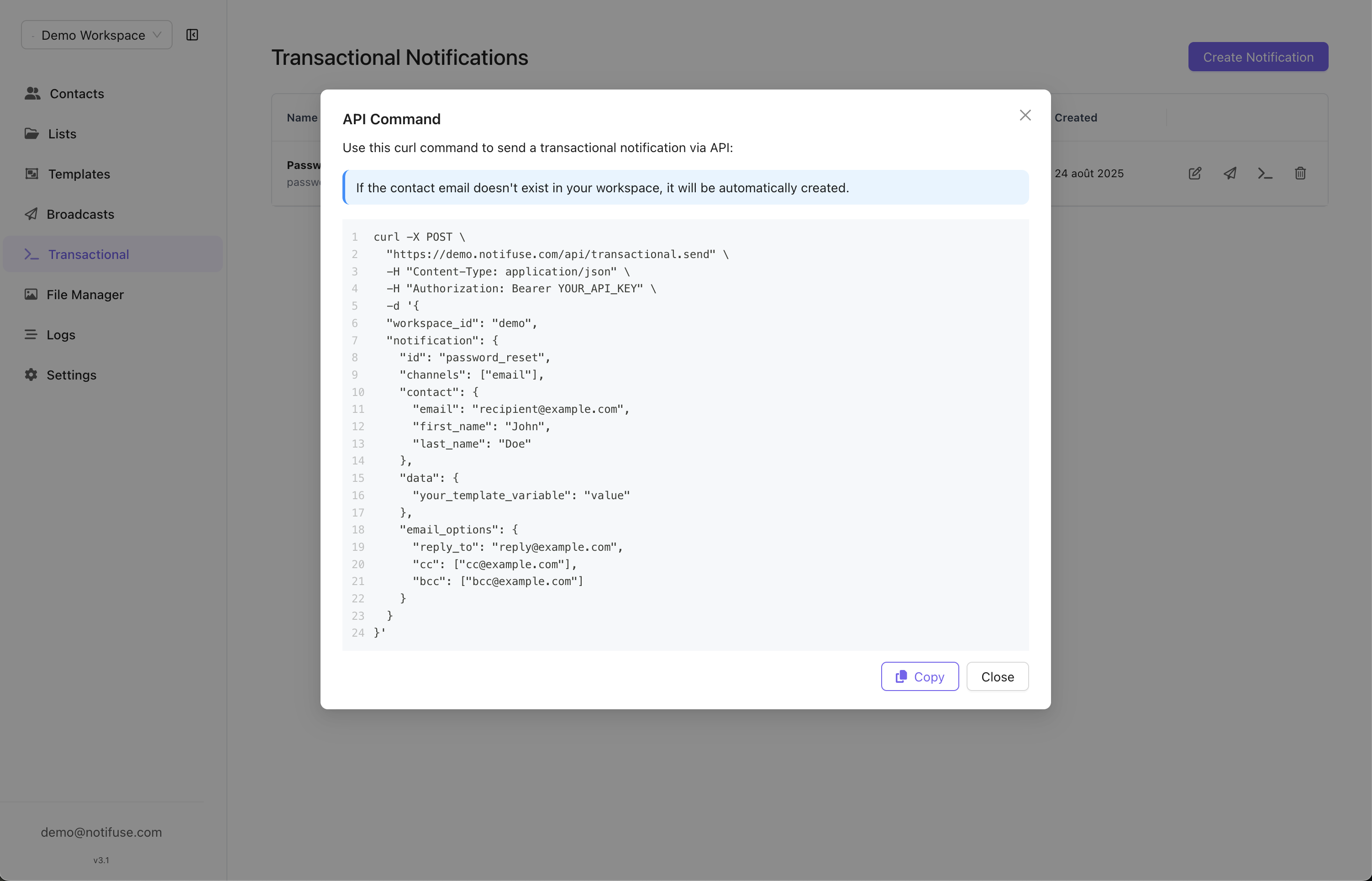
Send transactional emails using a simple POST request:Request
Parameters
Email Options
Data vs Metadata
Template Variables (data)
The data object contains variables that will be available in your email templates:
{{ order_id }}, {{ total }}, {{ discount_code }}
Tracking Data (metadata)
The metadata object stores information for analytics and tracking but is not available in templates:
Email Attachments
Send files with your transactional emails such as invoices, receipts, tickets, or documents. Attachments are automatically deduplicated and stored efficiently.Attachment Limits
- Maximum files: 20 attachments per email
- File size: 3MB per file
- Total size: 10MB per email
- Supported formats: All file types (PDF, PNG, JPEG, DOCX, etc.)
Attachment Parameters
Example with PDF Invoice
Example with Multiple Attachments
Inline Images (Content-ID)
Embed per-recipient images — such as QR codes or personalized graphics — directly inside the email body instead of hosting them at a URL. Setdisposition to "inline" and give the attachment a content_id, then reference it from your template’s HTML as <img src="cid:...">:
content_idmay only contain letters, digits, and the characters._-@(max 255 characters), and is only accepted whendispositionis"inline".- When
content_idis omitted, the filename is used as the Content-ID, so<img src="cid:check-in-qr.png">also works. - Inline images are delivered inside a
multipart/relatedMIME part alongside the HTML body, so email clients embed them rather than showing them as downloadable attachments. - Because the image travels inside the message body, it is never fetched or logged by link proxies or image-caching services — suitable for per-recipient secrets like QR codes.
- On Mailgun, the
content_idalso becomes the delivered part’s filename, so prefer acontent_idwith a file extension (e.g.checkInQr.png) when sending through Mailgun.
Common Use Cases
- Order Confirmations: Attach invoices and receipts
- Booking Confirmations: Attach tickets and itineraries
- Legal Documents: Attach contracts and agreements
- Reports: Attach analytics reports and summaries
- Certificates: Attach completion certificates and badges
- Event Tickets: Embed per-recipient QR codes as inline images
SMTP Bridge
Notifuse includes a built-in SMTP bridge server that allows you to send transactional emails using standard SMTP clients instead of HTTP API calls. This is particularly useful when:- Legacy Systems: Integrating with existing applications that only support SMTP
- Email Libraries: Using standard email libraries in any programming language
- Framework Integration: Working with frameworks that have built-in SMTP support
- Gradual Migration: Moving from existing email providers without changing application code
How It Works
The SMTP bridge server accepts emails via SMTP on port 587 (STARTTLS) or 465 (implicit TLS). The email body must contain a JSON payload matching the Transactional API format. Authentication is done using your workspace API credentials.Sending Emails via SMTP
Authentication
- Username: Your workspace API email (the email associated with your API key)
- Password: Your workspace API key
- Security: STARTTLS (port 587) or implicit TLS / SMTPS (port 465), depending on your
SMTP_BRIDGE_TLSsetting - Server: Your configured SMTP bridge host (e.g.,
smtp.yourdomain.com)
Email Format
The email body must be a JSON payload matching the Transactional API format:Permissions
The Transactional write permission on its own is enough to send, over both the API and the SMTP bridge. That makes a send-only API key practical: create a key, grant it Transactional write, leave everything else off, and it can send email without being able to read or edit a single contact. See Admins & API Keys. Two limits apply to a key scoped that narrowly, and they apply identically to the SMTP bridge:- Without Contacts write, a send still creates the recipient’s contact when it does not exist yet, but only their email address is stored. Every other field of the
contactobject is dropped, and an existing contact is never modified. - Without Contacts read, a send that sets
ccorbccis refused. On the SMTP bridge those come from the message’sCc:andBcc:headers, so a send-only credential that sets them is rejected as the message is handed over.
/api/transactional.send: it also covers /api/transactional.testTemplate and /api/email.testProvider, which despite its name delivers a real message.
Transactional read covers only the notification definitions — listing them and opening one. It does not let a key send.
Template Integration
Data Structure in Templates
Your templates have access to both API data and contact profile:Complete Example
API Request:API Reference
Deduplication Examples
Order Confirmations
Password Resets
Welcome Emails
external_id patterns ensures that duplicate notifications are automatically prevented, even if your application sends multiple requests.
For complete API documentation and additional parameters, see the API Reference.