
docs.example.com linking to www.example.com appears in your reports.
Default Rules
A new workspace starts with 40 rules covering paid search, paid social, paid video, display, organic search, organic social, email and direct. They are ordinary rules: you can edit or delete any of them.Email sits above Direct Traffic deliberately. Many mail clients strip the referrer, so a click from an email otherwise looks like someone typing your address — which is why your broadcasts should carry UTM parameters.
How Rules Are Applied
Rules run by priority, highest first, and every matching rule contributes — evaluation does not stop at the first match. Precedence is per target rather than per rule:- For each target, the highest-priority rule that writes it wins.
- A lower-priority rule can still write a target no higher-priority rule claimed. A rule that only sets
custom_3therefore applies even when a higher-priority rule already set the channel. - Two matching rules at the same priority both run, and the later one overwrites — a tie goes to the last rule, not the first.
set as defaultnever claims a target, so a lower-prioritysetstill overrides a default written earlier. That is how the priority-10 fallback works.
Writing a Rule
A rule is a set of conditions and the values to write when they all match. All conditions of a rule must match for it to apply.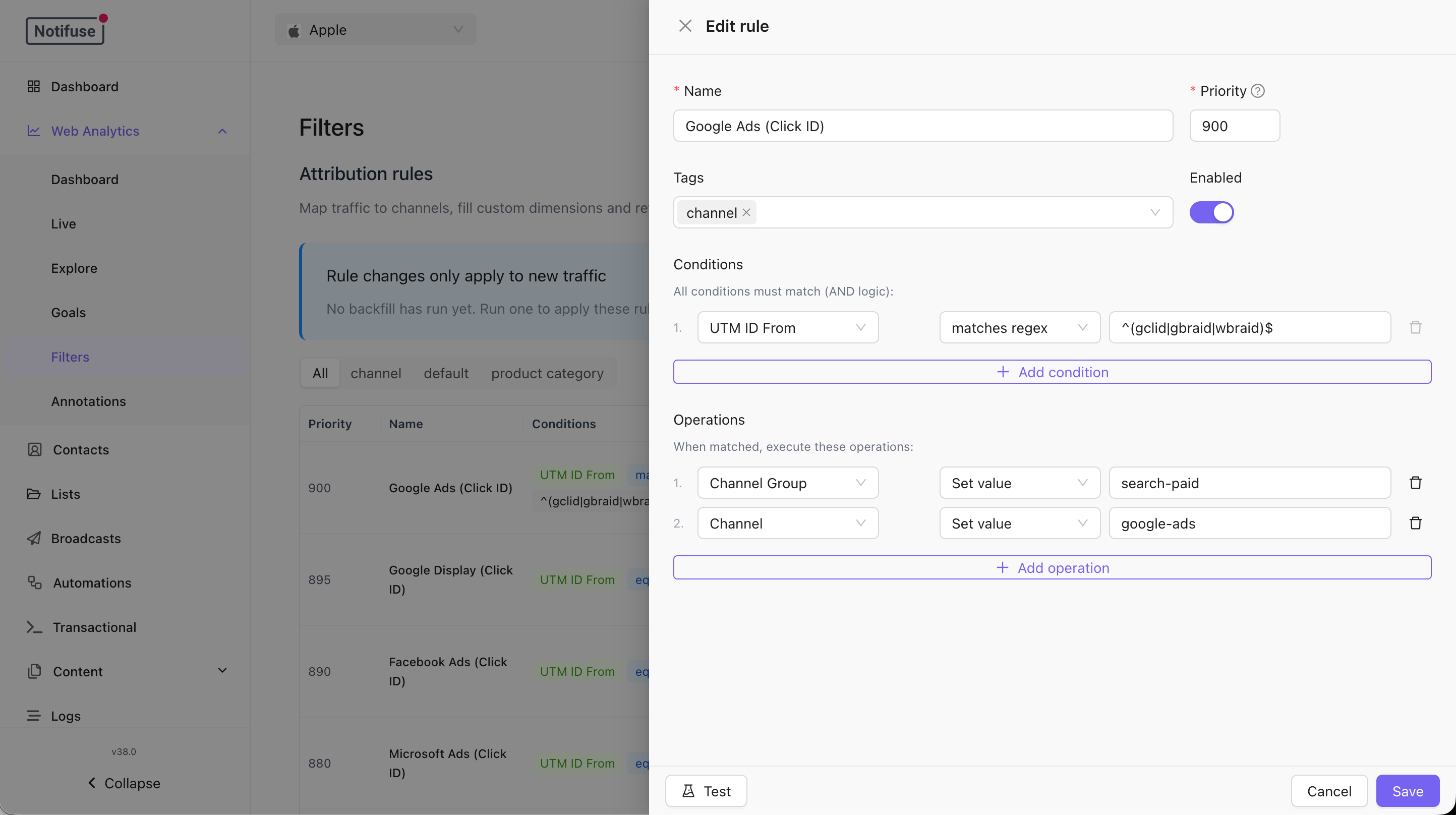
- Conditions test any tracked signal: the referrer, referrer domain and referrer path, is-direct, the landing page, domain and path, the current path, every UTM parameter and the ad click ID, plus device, browser, browser type, OS, user agent, connection type, language and timezone.
- Operators are
equals,not equals,contains,not contains,is empty,is not emptyandregex. - Operations then
seta value,setit only as a default where nothing else has written one, orunsetit. - Targets are Channel, Channel Group, any of the five UTM fields, Referrer Domain, Is Direct, and
custom_1throughcustom_10.
Ad Click IDs
The tracker recognises thirteen ad click ids on the landing URL:gclid, wbraid
and gbraid (Google Ads), dclid (Google Display), fbclid (Meta), msclkid
(Microsoft), ttclid (TikTok), li_fat_id (LinkedIn), twclid (X), epik
(Pinterest), ScCid (Snapchat), rdt_cid (Reddit) and qclid (Quora).
The first one present lands in utm_id, and the parameter it came from in
utm_id_from — so a paid click is attributable even when the campaign forgot its
UTMs. “First” means first in that list, not first in the URL, so a link carrying
both gclid and fbclid is attributed to Google.
Matching ignores case: ?sccid=, ?ScCid= and ?SCCID= are all recognised, and
utm_id_from always records the canonical spelling above — which is what the
built-in rules match on.
To capture a click id of your own in addition to those thirteen, set
extraAdClickIds: ['myclid'] in NotifuseAnalyticsConfig. adClickIds also
exists but replaces the list outright, and adClickIds: [] captures none —
use it only when that is what you want. A rule matching on utm_id_from only
ever fires for a parameter the tracker was told to capture.Changing Rules Later
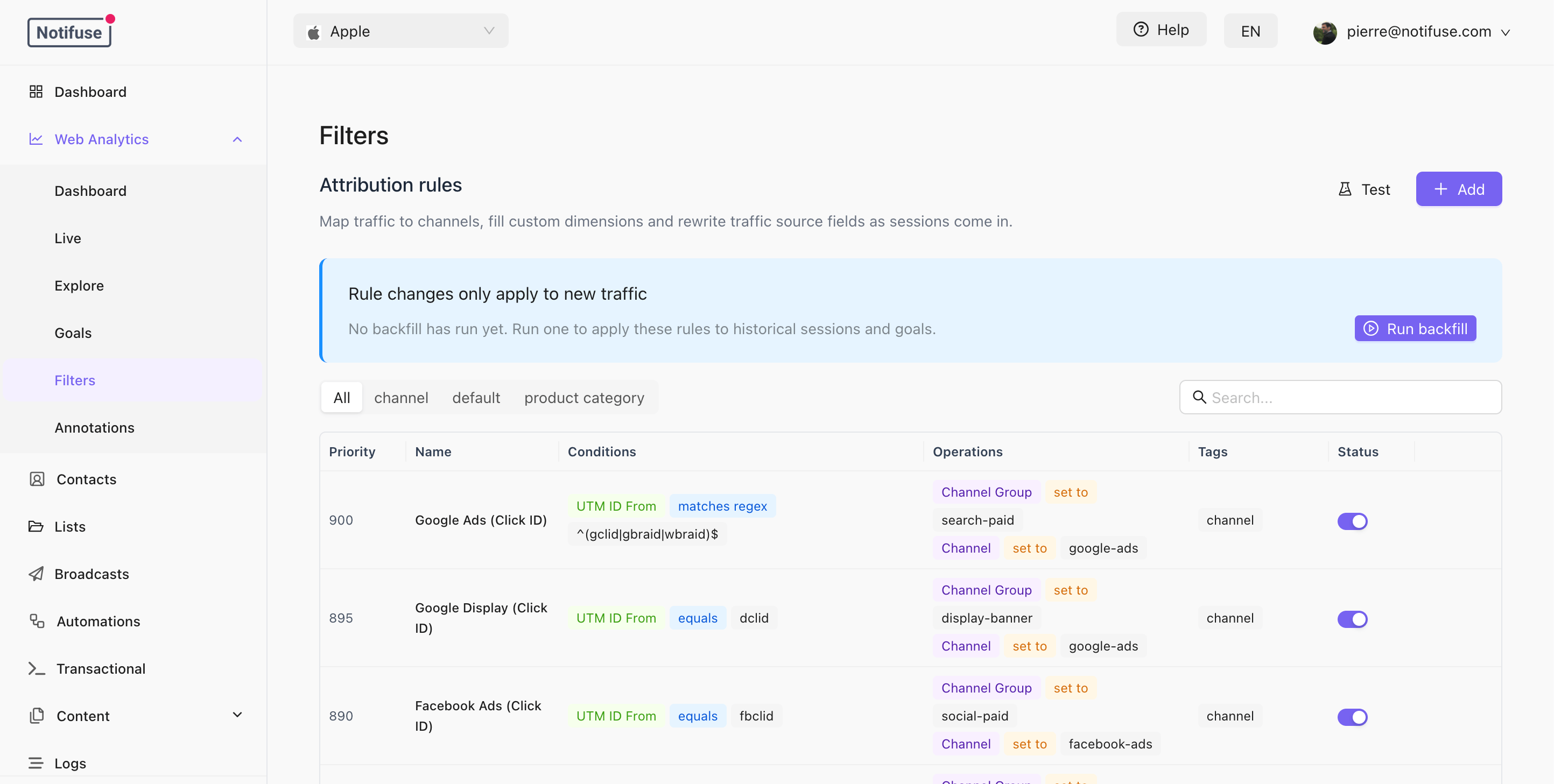
Rules are applied when a visit is recorded, so editing them changes what happens next, not what already happened. To apply them to existing traffic, run a backfill from the Filters tab. A backfill rewrites the attribution columns on historical session and goal rows — which is what updates “revenue by channel” for past traffic. It never adds, removes or re-times traffic, and pageview rows are not touched at all.Where the Traffic Comes From
Broadcasts add UTM parameters to their links — see Broadcast Campaigns → UTM Tracking. Those are exactly what the seeded Email rule looks for, so campaign traffic classifies itself with no extra work.Notes
- Attribution is resolved per session, from the landing page. A visitor who arrives from a search and later clicks one of your emails starts a new session with its own attribution once the first has ended.
- Goals start from their session’s attribution, then re-run the rules with the goal’s own page path. A goal matches its session unless one of your rules tests the current path.
- The rule set is versioned by a hash the server recomputes on every save. The console compares it against the version of the last completed backfill to warn you when your history was attributed under a different rule set. A backfill rewrites every historical row, not just the stale ones.
- API Reference